The most common mistake teams make when wiring AI into a workflow is reaching for the most powerful model they can afford.
It feels safe. It is usually wrong.
In real automation, the bottleneck is almost never raw reasoning power. It is latency, cost per call, schema compliance, and tool-use reliability. Pick the wrong model on those four axes and even the best workflow design will feel slow, expensive, or flaky.
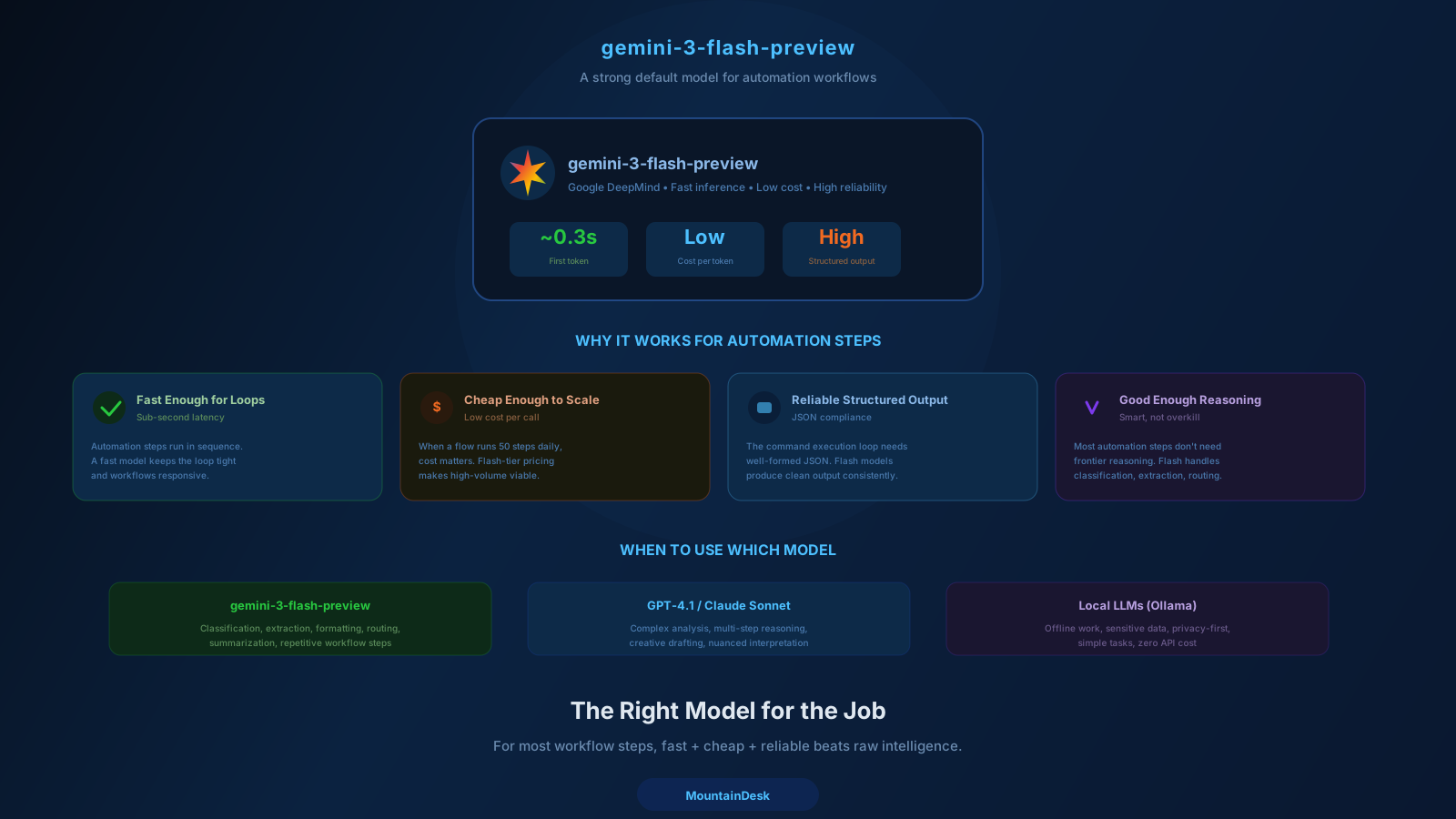
That is why a fast, cheap, structured-output-friendly model like gemini-3-flash-preview ends up being the right default for a surprising number of automation steps. Not because it beats every benchmark. Because it wins on the dimensions automation actually cares about.
This post explains the reasoning, where the limits are, and how to decide when to upgrade.
The Four Dimensions That Actually Matter for Automation
When a model is part of an automation workflow, you should grade it on four things:
1. Latency
How long does a single call take?
Sub-second matters. Two seconds is noticeable. Five seconds is a conversion killer in onboarding flows and a UX killer in interactive ones. For background jobs, latency multiplied by call count = total runtime, which directly affects how often you can run a workflow.
2. Cost per Call
A model that is 10x cheaper at equivalent quality changes what you can afford to run.
If your workflow makes 10,000 calls a month, the difference between $0.50 / 1M tokens and $5 / 1M tokens is the difference between a $50 bill and a $500 bill — for the same outcome.
3. Structured Output Reliability
Most automation steps need the model to return JSON, structured fields, or a precise tool call.
A model that returns "almost JSON" with stray prose breaks the next step. The right model is the one that consistently returns the schema you asked for, on the first try, with no parsing heroics.
4. Tool Use / Function Calling
Modern automation is rarely "just generate text." It is "decide which tool to call, with what arguments, and react to the result."
A model with weak tool-use will waste turns, hallucinate arguments, or fail to recover from errors. A model with strong tool-use compounds in agent loops.
Notice what is not on this list: PhD-level reasoning, long-form writing skill, or chart-of-the-month benchmark wins. Those matter for some workflows. They do not matter for most.
Why gemini-3-flash-preview Hits This Sweet Spot
The Flash family from Google has been refined specifically for this use case: low latency, low cost, strong structured output, and dependable tool use. The 3-flash-preview generation pushes that further.
1. Latency in the Sub-Second Range
On typical short-context calls, Flash-class models respond in well under a second. For automation steps where the model is one of many in a chain, that adds up. A 5-step flow with 800ms per step finishes in around 4 seconds. The same flow with a 4-second-per-step heavyweight model finishes in 20+ seconds.
This is exactly the "12 seconds → 3 seconds" insight a lot of growth teams have written about. Cutting latency on AI steps inside onboarding and operational flows directly changes retention and throughput.
2. Cost Profile Built for Volume
Flash-class models are priced for high-volume use. That means you can run more benchmarks, more loops, more retries, more background jobs without watching the bill spike.
For workflows that touch the model many times — agent loops, batch classification, scheduled jobs — this compounds heavily.
3. Structured Output and Tool Calling
The Flash generation has been improved specifically for JSON-mode reliability and function calling. In MountainDesk's command execution loop — where the model emits runnable JSON actions that the platform executes and feeds back — that reliability is the difference between a flow that works on the first try and one that needs constant babysitting.
4. Multimodal Input
Flash supports image inputs. That matters when your automation steps involve screenshots, captures, or document images — a real category of operational work that pure-text models simply cannot handle in one step.
5. Available Locally and as a Cloud Option
For workflows where data must stay on-machine, a local Flash-class model gives you a fast default that does not leave the network. For everything else, the cloud version is a drop-in.
This combination — fast, cheap, structured, multimodal, available both ways — is exactly what most automation steps need.
When You Should Upgrade
Defaulting to gemini-3-flash-preview does not mean using it for everything. It means using it as the base layer and upgrading specific steps where the requirements change.
Upgrade to a heavier model when:
1. The Step Requires Genuine Multi-Hop Reasoning
Strategy synthesis, complex planning, hard math, multi-document analysis where conclusions depend on subtle cross-references. A larger Pro/Opus-class model is worth it.
2. The Output Is the Final Deliverable
A client-facing proposal, a published article, a polished email — anything where output quality directly affects revenue or trust. Use the best model you can afford for the final pass.
3. The Cost of a Wrong Answer Is High
Legal interpretations, medical context, financial calculations, code that touches production. The cost differential between models is small relative to the cost of a mistake.
4. Long Context Matters
If you are stuffing the entire codebase, a long contract, or weeks of conversation into one prompt, you need a model with both the context window and the long-context retrieval quality to handle it. Flash-class is excellent for short and medium context. For very long context, you upgrade.
The right pattern is mixed-model orchestration: Flash for the high-frequency steps, a heavier model for the high-stakes steps, all inside the same workflow.
A Realistic Mixed-Model Workflow
Take a competitive intelligence flow.
| Step | Model | Why |
|---|---|---|
| Pull pages from 5 competitor sites | n/a (browser automation) | Not a model job |
| Extract structured data from each page | gemini-3-flash-preview | Fast, cheap, JSON-reliable, run 5 times |
| Diff today vs. yesterday for each site | gemini-3-flash-preview | High-volume comparison work |
| Decide which changes are material | gemini-3-flash-preview or stronger | Judgment call, can stay light if criteria are clear |
| Draft the executive summary | a stronger model (Pro / Opus / GPT-class) | Final-deliverable quality matters |
| Send to Slack | n/a (action) | Not a model job |
You spent the heavy model on the one step where it pays off. Everything else ran on a Flash-class default. Cost per run drops dramatically without quality loss on the parts that matter.
This is the model-routing pattern that mature automation setups converge on.
How to Pick the Default for Your Stack
There is no universal "best" model. There is the model that wins the dimensions your workflow cares about. To pick a default:
Step 1: Profile Your Real Workload
What is the average call doing? Short structured extraction? Tool selection? Long-form drafting? Multimodal analysis?
Step 2: Benchmark on Your Actual Tasks
Generic leaderboards do not predict your workflow. Run 20 representative calls through 3-5 candidate models. Score on:
- Latency (P50 and P95)
- Cost per call
- JSON / schema compliance rate
- Tool-use success rate
- Output quality on your task
Step 3: Pick the Default by the 80/20 Rule
The model that wins the most common 80% of your steps is your default. Specialized models cover the other 20%.
Step 4: Make It Easy to Override per Step
Do not hard-code one model for the whole workflow. Let each node in the flow override the model when it needs to.
For most teams running this exercise today, a Flash-class model — with gemini-3-flash-preview as a strong specific candidate — wins the default slot.
Local vs. Cloud for Flash-Class Models
A nice property of the Flash family is that you can run very capable models locally on a modern workstation, and run the equivalent cloud-hosted version when you need to scale or share.
Run Locally When
- The data should not leave the machine.
- You need predictable cost (zero marginal per-call cost).
- Latency is even more critical than cloud round-trip allows.
- You want offline reliability.
Run Cloud When
- Multiple operators need the same model from different machines.
- Your local hardware can't handle the throughput.
- You need the largest context window the cloud version offers.
- You want the latest preview revisions automatically.
In MountainDesk, both paths are first-class. The model picker shows local models side by side with 360+ cloud models available through MountainDesk Cloud, and a flow can mix them step by step.
How MountainDesk Helps You Use the Right Model per Step
The orchestration layer is where model selection actually pays off — but only if the platform makes it cheap to use the right model in the right place.
MountainDesk supports this directly:
- Multi-model picker — Switch between OpenAI, Anthropic, GitHub Copilot, local LLMs (including gemini-3-flash-preview, gemma, qwen, gpt-oss, and more), and 360+ managed cloud models from one dropdown.
- Per-flow and per-node model override — A scheduled job can declare a model. A specific node inside a visual flow can declare a different one. You compose the cheap defaults with the expensive specialists.
- Cloud-managed access through MountainDesk Cloud — Plan-gated allowlists and usage ledger so a team can standardize across 360+ available models, compare spend, and watch where usage goes.
- Local-first execution — Sensitive steps stay on-machine through local model providers; non-sensitive steps can use cloud frontier models.
The point is not to evangelize one model. It is to make model routing a decision you make per step, not per workflow.
Final Takeaway
For most automation steps, the right model is fast, cheap, structured-output-friendly, and good at tool use — not the most powerful model on the leaderboard.
gemini-3-flash-preview is one of the strongest defaults in that category right now. It is a great base layer for high-volume steps inside automation flows.
Use it as your default. Upgrade per step when reasoning depth, output quality, or context window genuinely demand it.
That is how you get fast workflows that produce high-quality outcomes without burning your model budget.
Try MountainDesk Free
Switch between local and cloud models per step. Mix Flash-class defaults with frontier models in the same flow.
MountainDesk is the desktop AI automation platform that lets you mix local and cloud LLMs across orchestrated workflows.