For most of the last decade, automation was treated like a side project.
Something a team explored when there was extra capacity. A spare engineer. One painful process that finally became impossible to ignore.
Leadership framed it as cost cutting:
- Replace a few manual steps.
- Save a few hours.
- Move on.
That framing made sense in a slower market. It does not fit the market most companies operate in today.
The teams pulling ahead in 2026 are not winning because they discovered a better tool.
They are winning because they redesigned how work moves through the business.
Automation is no longer a one-off improvement. It is becoming the operating layer that decides how fast information moves, how consistently work gets completed, and how much output a team can produce without scaling headcount in a straight line.
Why Manual Workflows Quietly Stop Scaling
Most teams do not break because their people are incapable.
They break because too many important steps still depend on memory, repetition, and constant context switching between tools.
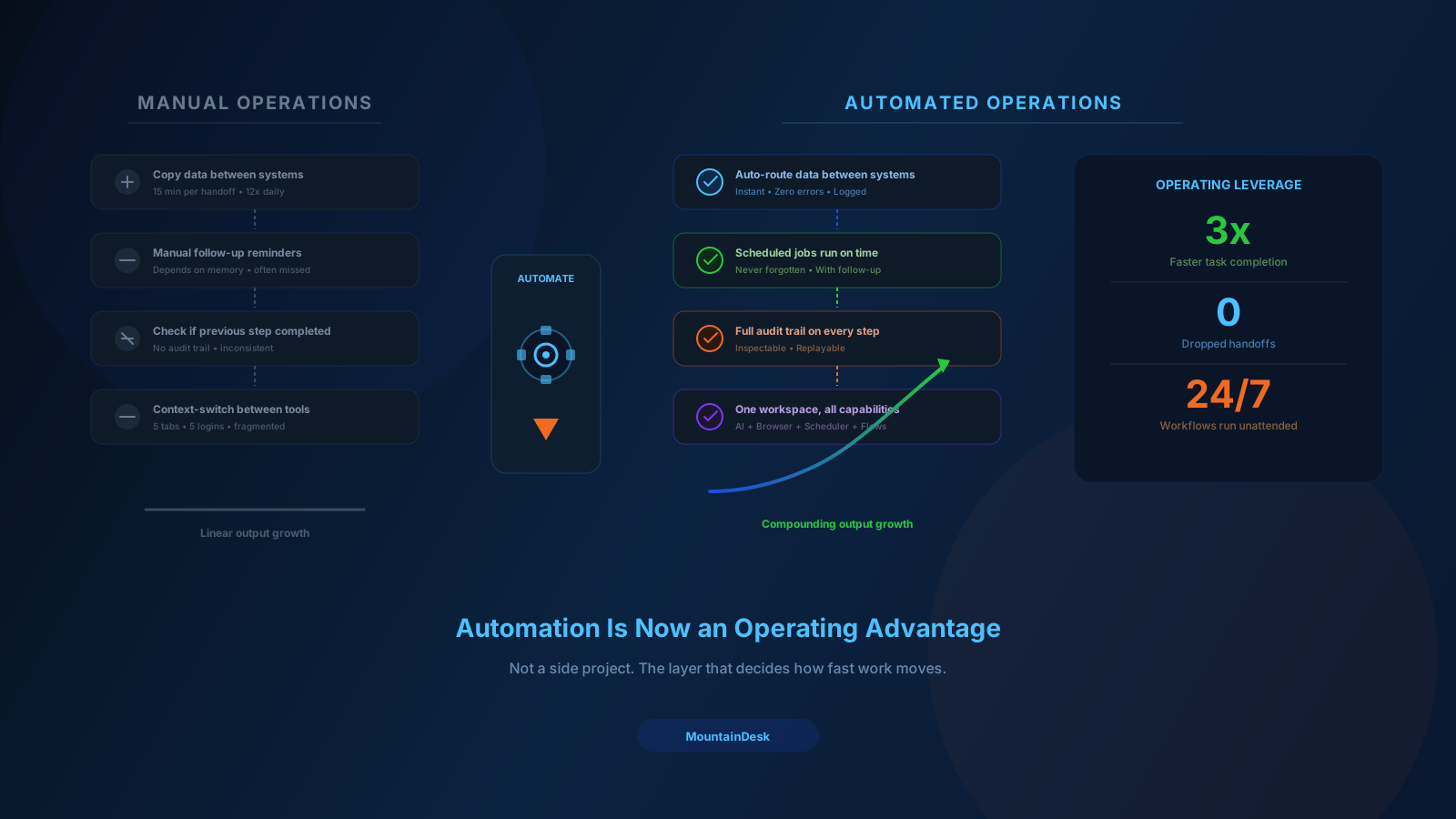
One person copies information from one system to another. Another teammate follows up manually. A third person checks whether the previous step was actually completed.
Nothing looks catastrophic on its own. But the compound effect across a quarter is expensive.
Manual workflows usually create four overlapping problems:
1. Delay Between Steps
Work waits for a human to remember it, especially across handoffs, time zones, and tools.
2. Inconsistency in Execution
Different people interpret the same process differently, so output drifts over time.
3. Invisible Quality Gaps
The real workflow lives in habits and tribal knowledge, not in a system you can inspect or measure.
4. Skilled People Stuck on Busywork
Your most capable operators spend a meaningful share of their week on tasks that do not require their judgment.
This is why operations begin to feel heavy long before a team becomes large.
The issue is rarely effort. The issue is workflow design.
What Good Automation Actually Does
It is easy to underestimate automation when you only look at single-task examples.
A script that renames a file is useful, but it is not the point.
Real value appears when automation reduces friction across an entire sequence of work, not just one step in it.
A strong workflow can:
- Collect inputs
- Route context
- Trigger the next step
- Escalate exceptions
- Leave a clear audit trail behind
When automation is designed well, it creates compounding advantages in three directions at once:
- Speed. Tasks move forward immediately instead of waiting for the next manual touchpoint.
- Consistency. The same logic runs every time, so the output becomes predictable.
- Focus. People spend less time on coordination and more time on review, strategy, and creative work.
Teams rarely lose momentum because they lack effort. They lose momentum because too much of that effort is spent moving information instead of making decisions.
Automation Is Also a Quality System
One of the most overlooked benefits of workflow automation is quality control.
When a process becomes explicit, it becomes easier to improve. You can:
- See the steps
- Test alternative logic
- Measure where things fail
- Add approvals where they matter
A manual process is often opaque, even to the people running it.
An automated process is inspectable.
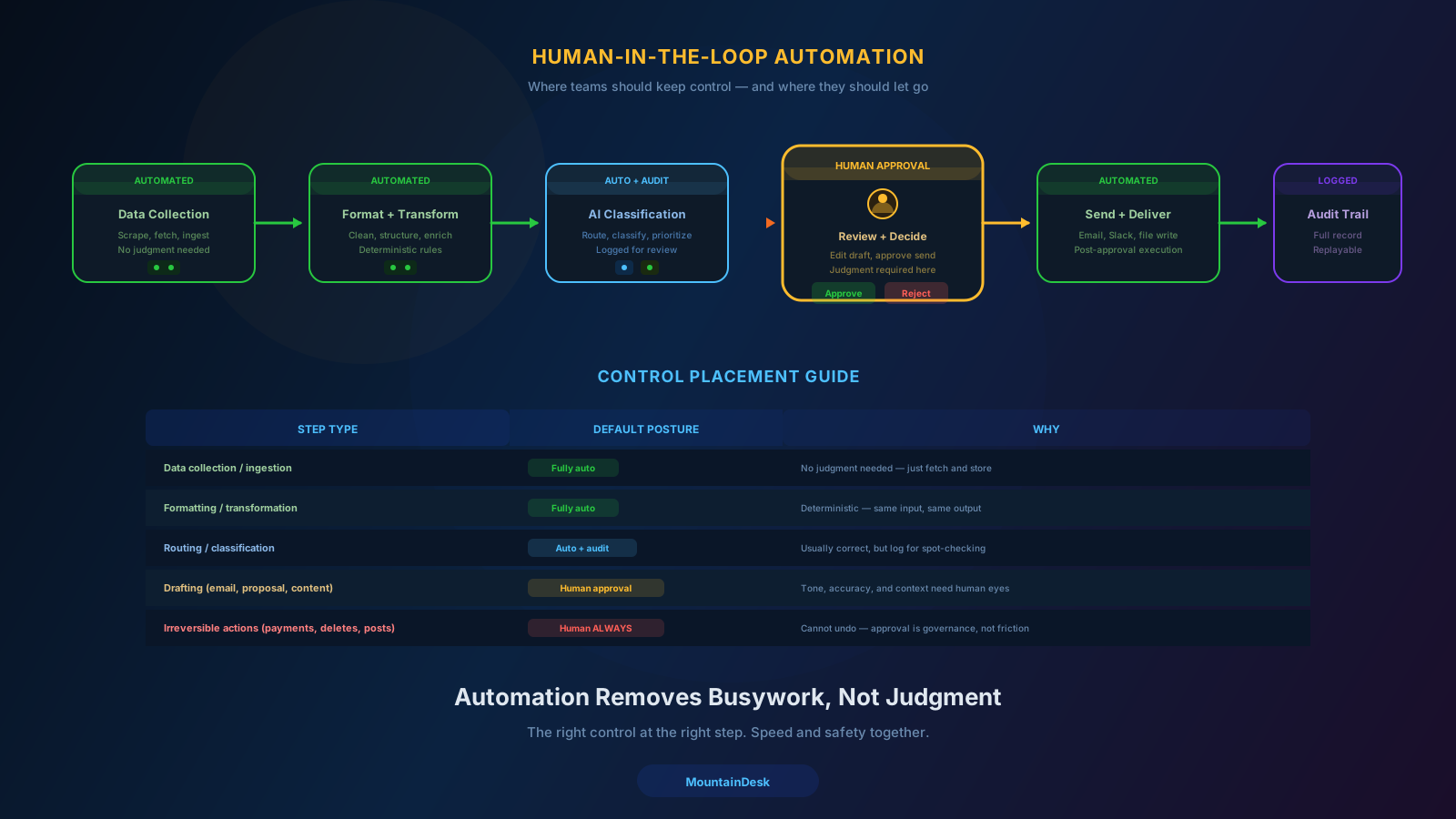
The strongest workflows still keep humans in the loop where judgment matters. Automation handles collection, formatting, routing, scheduling, and first-pass execution. People step in for approval, interpretation, and final delivery.
This is the model more high-performing companies are converging on now: not people versus automation, but people supported by automation.
Why This Shift Matters Now
Three things changed in the last few years and together they reframed how seriously teams should take automation.
1. AI Got Reliable Enough for Real Work
Modern models can read context, draft content, summarize information, classify inputs, and produce structured outputs reliably enough to participate in actual workflows.
2. Browser and Desktop Automation Got Dependable
A meaningful share of operational work still happens inside web interfaces and desktop apps. The tooling for automating those interactions can now run end-to-end instead of stopping at the first browser screen.
3. Orchestration Became the Real Unlock
The earlier wave of automation tools focused on single use cases. The current wave is about coordinating capabilities together — AI output, browser actions, scheduled jobs, file context, approvals, notifications — inside one system instead of stitched across half a dozen tabs.
That third shift is the one most teams underestimate.
Capability without orchestration becomes tool sprawl. Orchestration is what turns capability into leverage.
Where Most Teams Should Start
The best starting point is rarely the flashiest use case.
It is usually the workflow that:
- Runs often
- Touches multiple tools
- Involves a handoff
- Creates avoidable delay or rework when it goes wrong
Onboarding, recurring reporting, content distribution, support triage, prospect research, document handling, and internal status updates are common candidates.
A useful filter is to ask three questions about any process:
- Does it run on a predictable trigger or schedule?
- Does it move information across more than one tool or person?
- Would a delay or mistake here cost real money, time, or trust?
If the answer to all three is yes, the process deserves a workflow design — not just a manual habit.
Start small, but do not think small. The first workflow should prove reliability. Once a team sees one process running with less friction, the next one becomes much easier to redesign.
Common Mistakes When Teams Roll Out Automation
Even teams that take automation seriously often slow themselves down with avoidable mistakes:
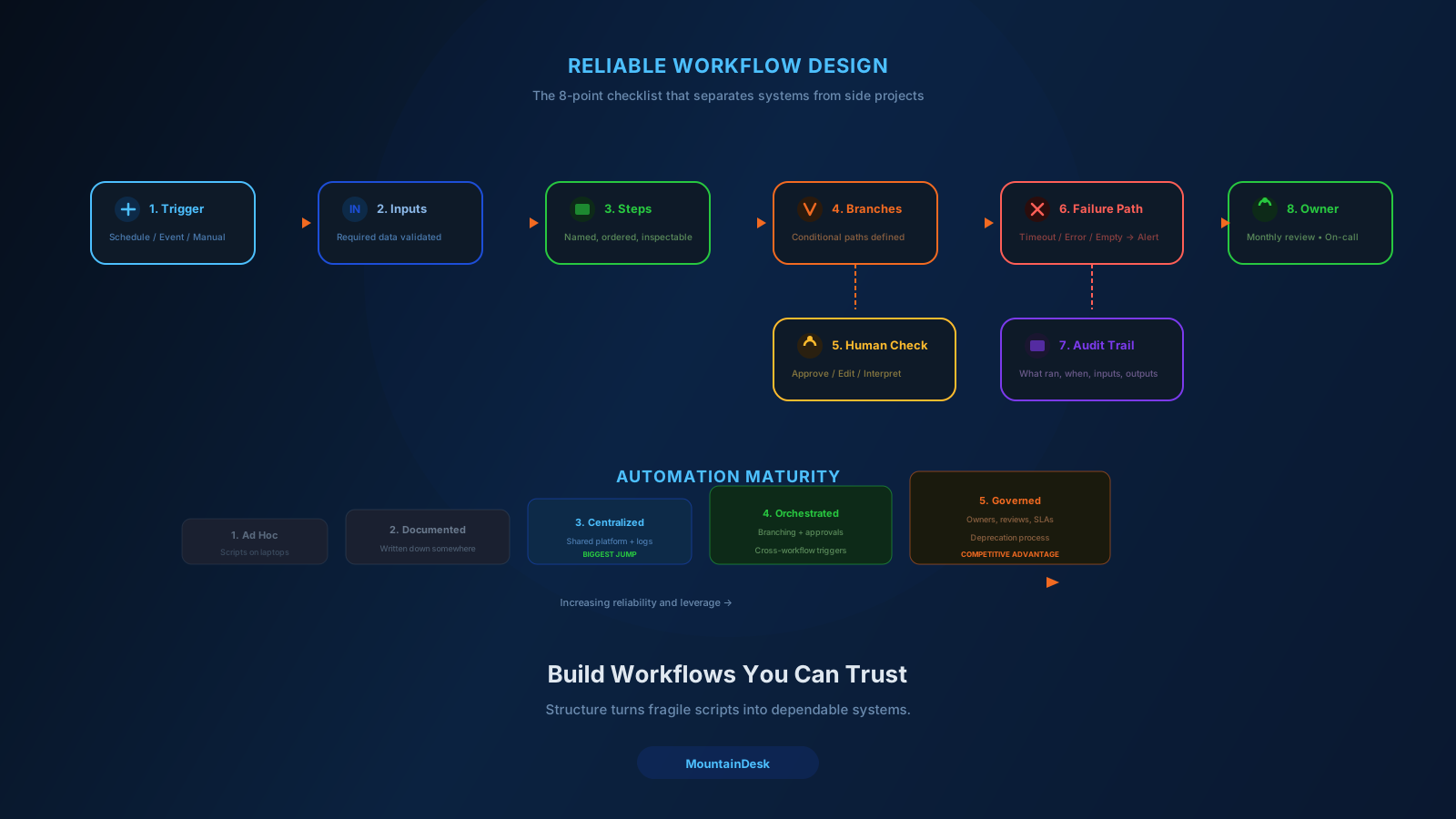
- Automating before defining the workflow. If steps are not clear on paper, they will not be clear in code.
- Hiding all the logic in one giant script. Reliability suffers because nothing is inspectable.
- Ignoring failure paths. A workflow that succeeds 80% of the time but fails silently is not safe to rely on.
- Removing humans from steps where judgment matters. Approvals are not friction. They are governance.
- Treating automation as a one-time project. Workflows need owners, reviews, and updates the same way products do.
Strong programs avoid these mistakes by treating workflows as living systems, not static deliverables.
What a Mature Automation Operating Model Looks Like
When automation is working well, it does not feel dramatic. It feels boring in the best possible way.
- Repeatable work runs on schedule.
- Handoffs happen without follow-up nudges.
- Exceptions get escalated visibly instead of disappearing.
- Operators can hand a workflow to someone else and expect the same outcome.
Mature programs share a few visible signals:
- Workflows are documented as actual flows, not loose chat-thread instructions.
- Recurring work is triggered by schedules, not memory.
- Browser, AI, and desktop actions are coordinated inside the same workflow.
- Approvals are placed deliberately — not everywhere, not nowhere.
- Failures are visible, recoverable, and easy to investigate.
That is the standard worth aiming for. Not heroic individual effort — a dependable system that makes output more predictable as volume grows.
Where MountainDesk Fits
MountainDesk is built for exactly this transition: moving from isolated automations to a real operating layer for repeatable work.
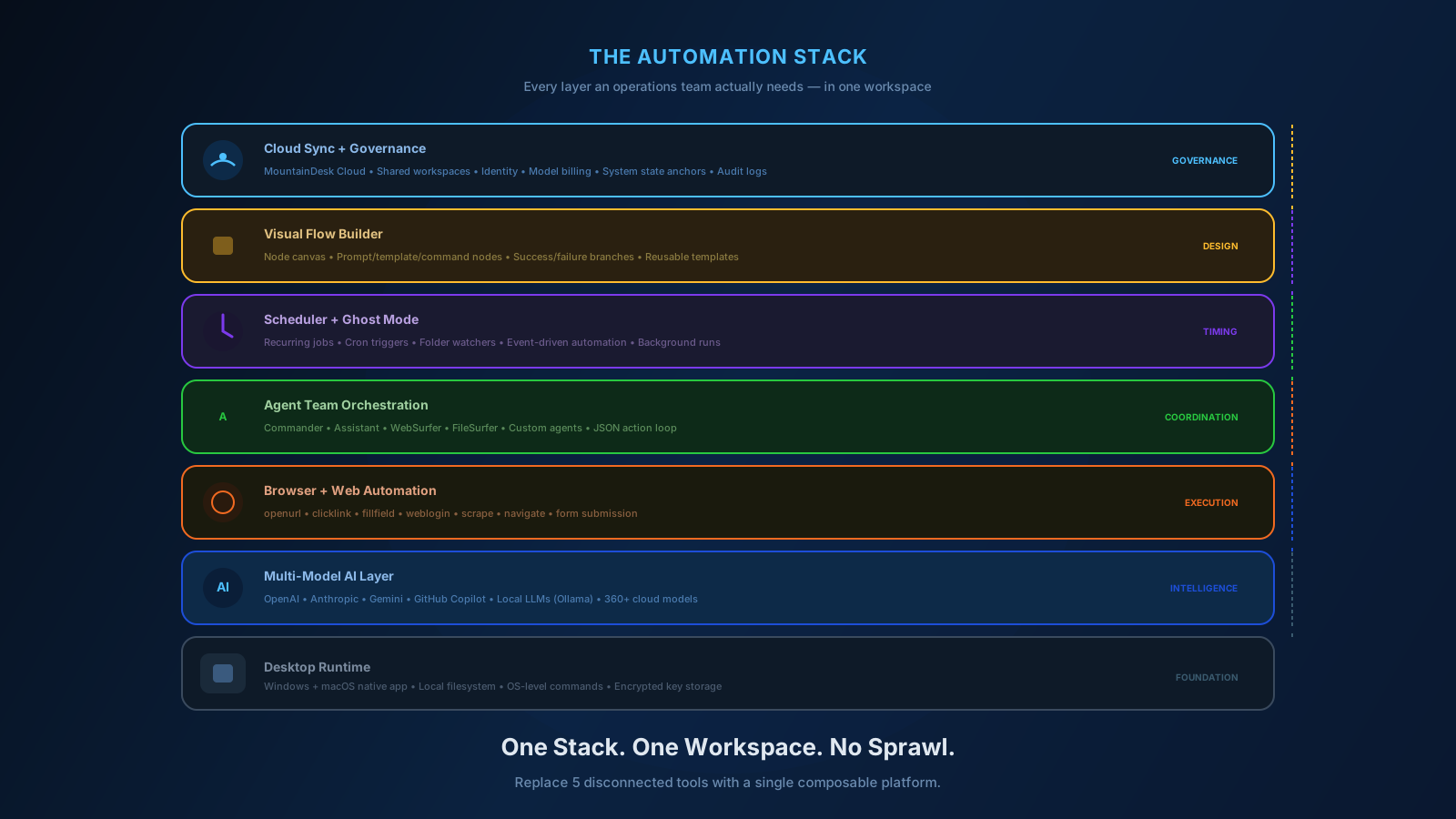
It is not just an interface for chatting with a model. It is a desktop control center that brings AI execution, browser automation, scheduled jobs, and reusable visual flows into one workspace — so a workflow can move from idea to execution without rebuilding context in five different tools.
A few capabilities make this possible in practice:
- Multi-model AI work in context. Switch between OpenAI, Anthropic, GitHub Copilot, local LLMs, and 360+ cloud models through MountainDesk Cloud while keeping working folders in scope.
- Browser and web automation. Logins, navigation, scraping, and form filling run inside the same workflow as your AI steps.
- Scheduled jobs. Recurring research, reports, and routine operational tasks run on time without anyone remembering them.
- Visual flow builder. Multi-step processes can be designed once, run many times, branched, retried, and handed to other operators.
- Cloud-backed workspaces. Prompts, settings, operational context, and shared access to 360+ managed models persist beyond a single device.
- Instant system state anchors. Risky automations get a recovery point before they run.
The point is not that MountainDesk replaces every tool a team already uses.
The point is that it gives teams a place to coordinate the work those tools produce.
The Decision in Front of Most Teams
The companies building durable advantages right now are not just adopting better tools.
They are designing better systems.
They are reducing the amount of manual coordination required to move work forward. They are making their best people more effective by removing the noise around the work that actually matters.
The question is no longer whether automation belongs in the business.
It does.
The real question is which workflow should be redesigned first, what role AI should play inside it, where humans should stay in the loop, and which platform will hold the whole operating layer together.
Ready to Make Automation an Operating Advantage?
If your team has outgrown one-off prompts, scattered scripts, and disconnected tools, MountainDesk is built to be that operating layer.
MountainDesk is the desktop AI automation platform for teams that orchestrate AI agents, browser tasks, and scheduled jobs from one workspace.