Most automation projects do not fail because the technology is wrong.
They fail because the workflow was never designed.
Someone wired a prompt to a button. Someone else added a script that scrapes a page. A third person built a Zap that sends a Slack message. Each piece works in isolation. Together, they create a fragile mess that nobody fully owns and nobody trusts.
The result is predictable:
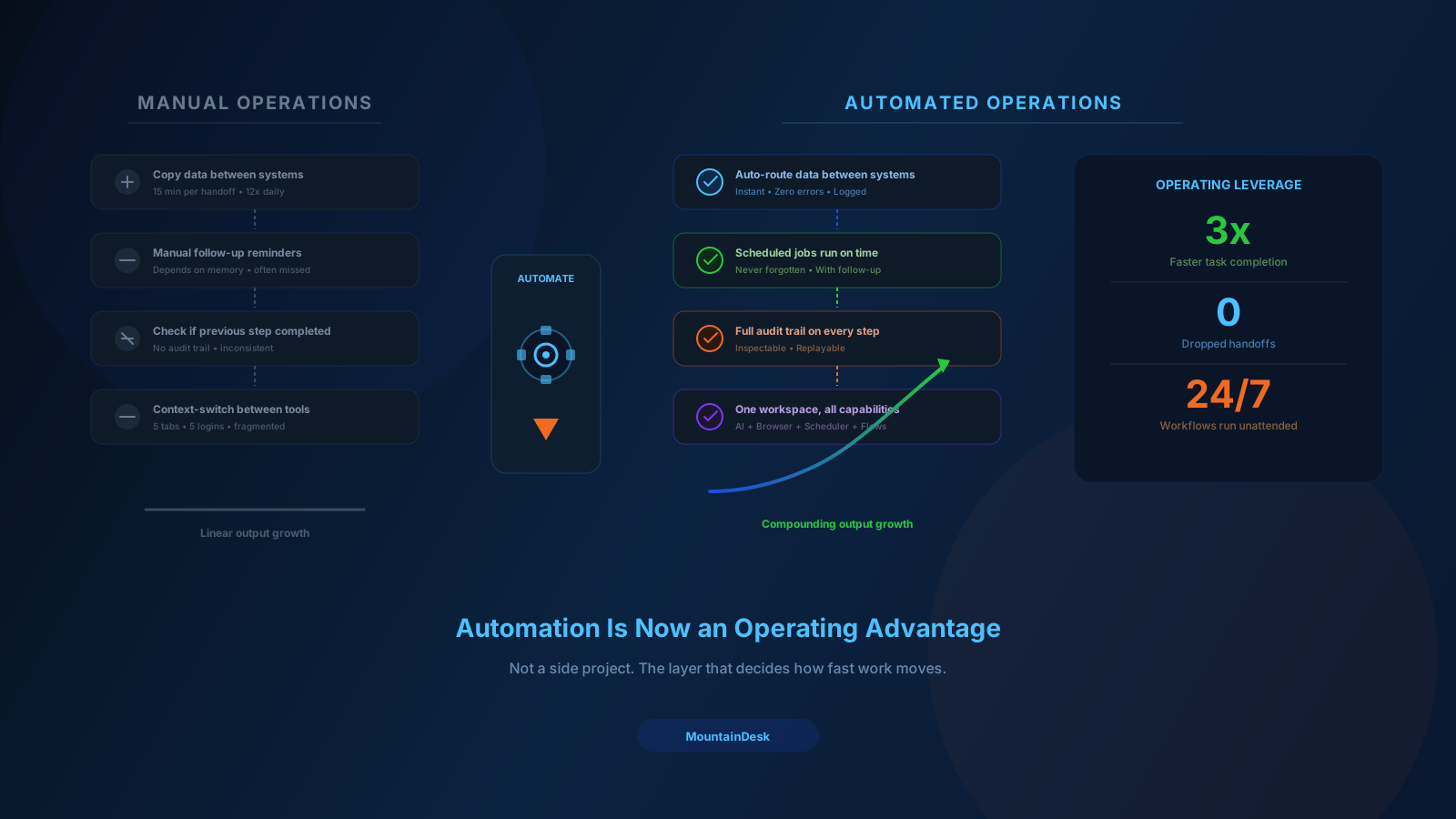
- Things break silently.
- Nobody can trace what happened.
- Work still requires a human to babysit it.
- Teams quietly stop relying on the automation.
If that pattern sounds familiar, the problem is not your tools.
It is the absence of workflow discipline.
What Reliable Automation Actually Looks Like
A reliable automation has the same shape, regardless of the tool you build it in:
- Defined inputs. What triggers it, and what data must be present.
- Explicit steps. Each action is named, ordered, and inspectable.
- Checkpoints. Places where the workflow pauses for review or approval.
- Failure paths. What happens when a step times out, errors, or returns nothing.
- An owner. A specific person responsible for keeping it healthy.
Miss any of those five and the workflow becomes someone's hidden side project that breaks at the worst possible moment.
The Hidden Cost of Fragile Automation
Fragile automation is often more expensive than no automation at all.
1. False Confidence
Teams assume the work is done. Then a silent failure means a customer never got the email, a report never got generated, or a lead never got logged.
2. Debugging Tax
When something breaks, the only person who understands it is the person who built it — and they are usually busy with something else.
3. Erosion of Trust
Once an automation has burned the team twice, people quietly add manual checks back in. Now you have automation plus the manual work it was supposed to remove.
4. Compounding Sprawl
Every fragile workflow becomes a small monument that nobody wants to touch. Over time the system becomes impossible to refactor.
The fix is not to automate less. It is to automate with structure.
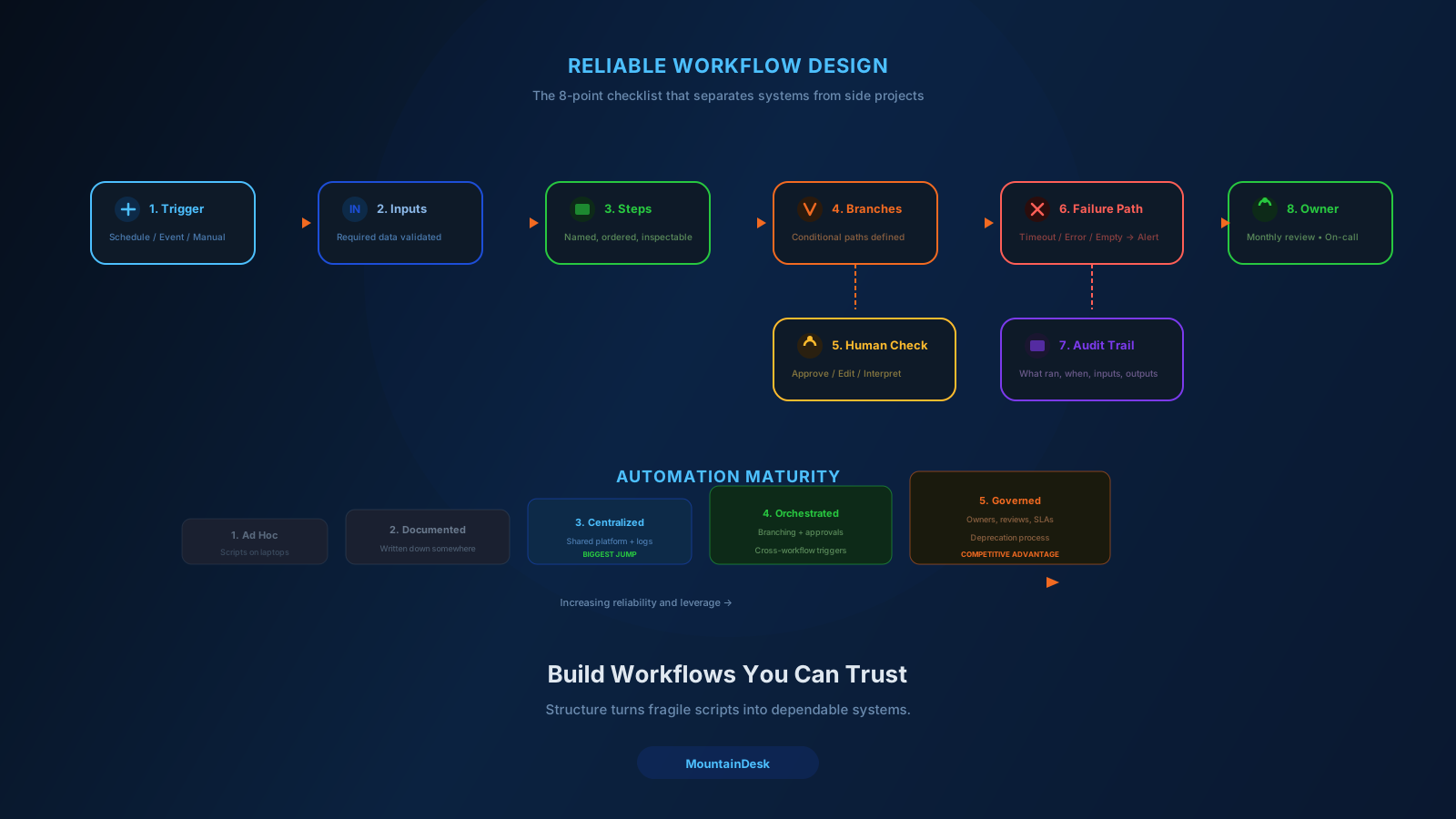
The Workflow Design Checklist
Before building any automation, walk through this checklist. It takes 15 minutes and prevents weeks of pain.
1. Trigger
- Is it scheduled, event-driven, or manual?
- What data must be available at trigger time?
2. Inputs
- What information does each step need?
- Where does that information come from?
- What happens if a required input is missing?
3. Steps
- Can each step be named in one sentence?
- Can it be run independently for testing?
4. Branches
- Where does the workflow split based on conditions?
- What is the default path?
5. Human Checkpoints
- Where does a person need to approve, edit, or interpret?
- How are they notified?
6. Failure Handling
- What happens on timeout?
- What happens on empty results?
- What happens on a 4xx or 5xx response?
- Who gets alerted?
7. Audit Trail
- Can the team see what ran, when, with what inputs, and what outputs?
- Can a failed run be replayed?
8. Ownership
- Who reviews this workflow monthly?
- Who is paged when it breaks?
If you can answer all eight, you are building a system. If you cannot, you are building a future incident.
Why "AI Step + Browser Step + Notification" Workflows Need Extra Care
The most common modern workflow looks like this:
- Pull data from a website or API.
- Send it to an AI model for processing.
- Take an action based on the AI output.
- Notify a human or write to a system.
Each link in that chain has its own failure mode:
- The website changes layout.
- The API rate-limits you.
- The model returns malformed JSON.
- The downstream action requires a field the AI omitted.
A reliable workflow assumes any step can fail and plans for it explicitly:
- Validate AI outputs against a schema before using them.
- Retry transient errors with backoff.
- Quarantine runs that fail validation so a human can review them.
- Log the inputs and outputs of each step for forensics.
This is the difference between an automation that runs once and an automation that runs ten thousand times.
Keep the Right Humans in the Right Places
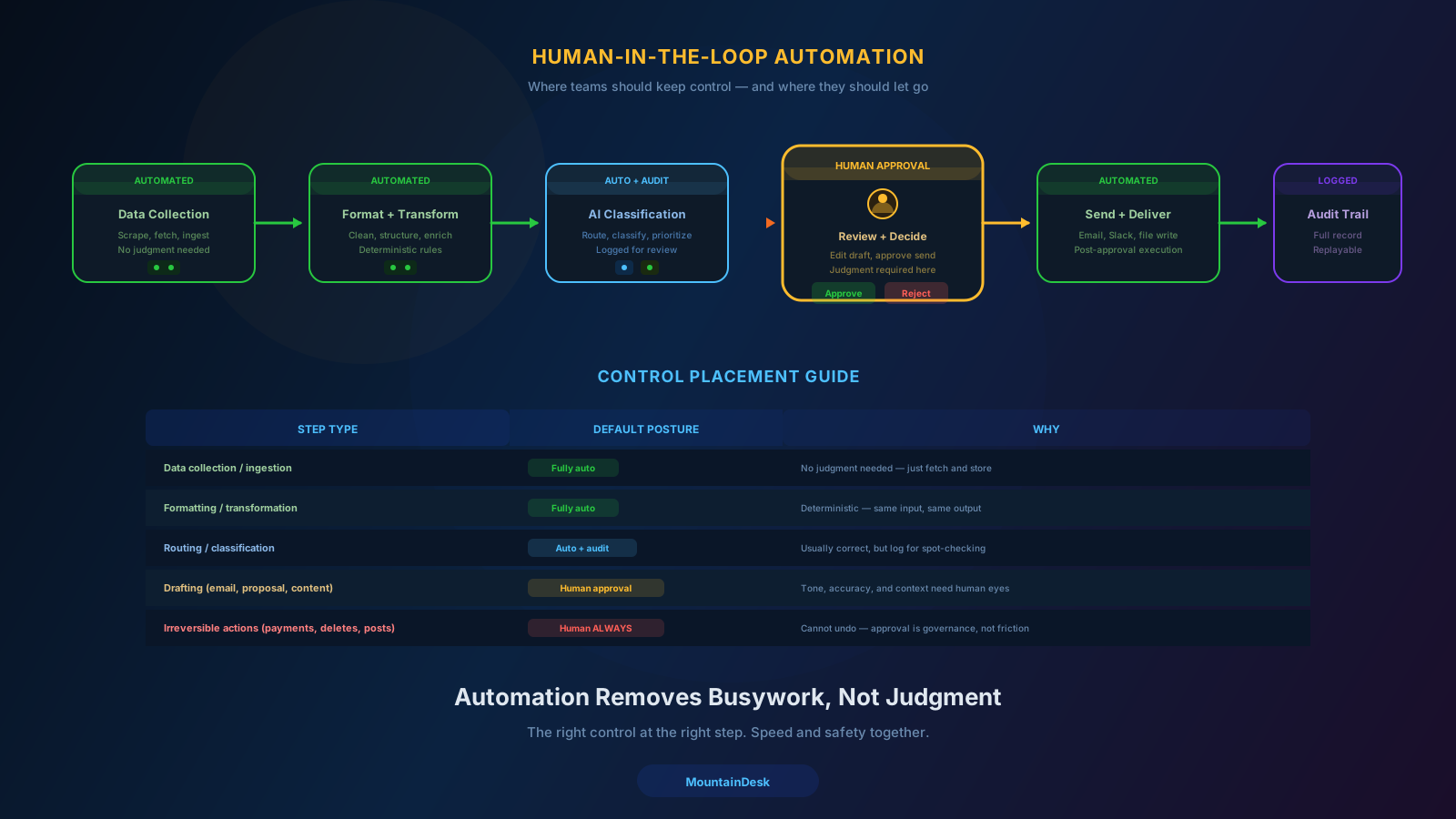
A common mistake is treating "human in the loop" as a binary.
It is not. It is a design decision per step.
| Step Type | Default Posture |
|---|---|
| Data collection | Fully automated |
| Formatting / transformation | Fully automated |
| Routing / classification | Automated with audit |
| Drafting (email, proposal, content) | Automated, human approval before send |
| Final delivery to a client | Human approval |
| Irreversible actions (payments, deletions, posts) | Human approval, always |
Automation should remove busywork, not judgment. The teams that get this right end up shipping more work, not less, because their people are spending time where it actually matters.
Build Once, Reuse Many Times
Reliable automations are reusable.
If every project starts from a blank canvas, you will keep rebuilding the same plumbing. The teams that move fastest treat their workflows as a library:
- A standard "research a company" flow.
- A standard "draft and send outreach" flow.
- A standard "generate weekly report" flow.
- A standard "monitor a folder and trigger AI" flow.
Each one is built once, tested, owned, and reused across projects. New work becomes a matter of composing existing flows, not rebuilding from scratch.
This is exactly what visual flow builders are good at — and why operations teams that adopt them tend to compound their automation advantage over time.
A Simple Maturity Model
You can score your automation practice on a five-step ladder:
- Ad hoc. Scripts and prompts live on individual machines.
- Documented. Workflows are written down somewhere, even if execution is manual.
- Centralized. Workflows run from a shared platform with logs.
- Orchestrated. Workflows trigger each other, with branching and approvals.
- Governed. Workflows have owners, reviews, SLAs, and a deprecation process.
Most teams sit at level 1 or 2. Moving to level 3 unlocks the largest jump in reliability. Levels 4 and 5 are where automation becomes a real competitive advantage.
Where MountainDesk Fits
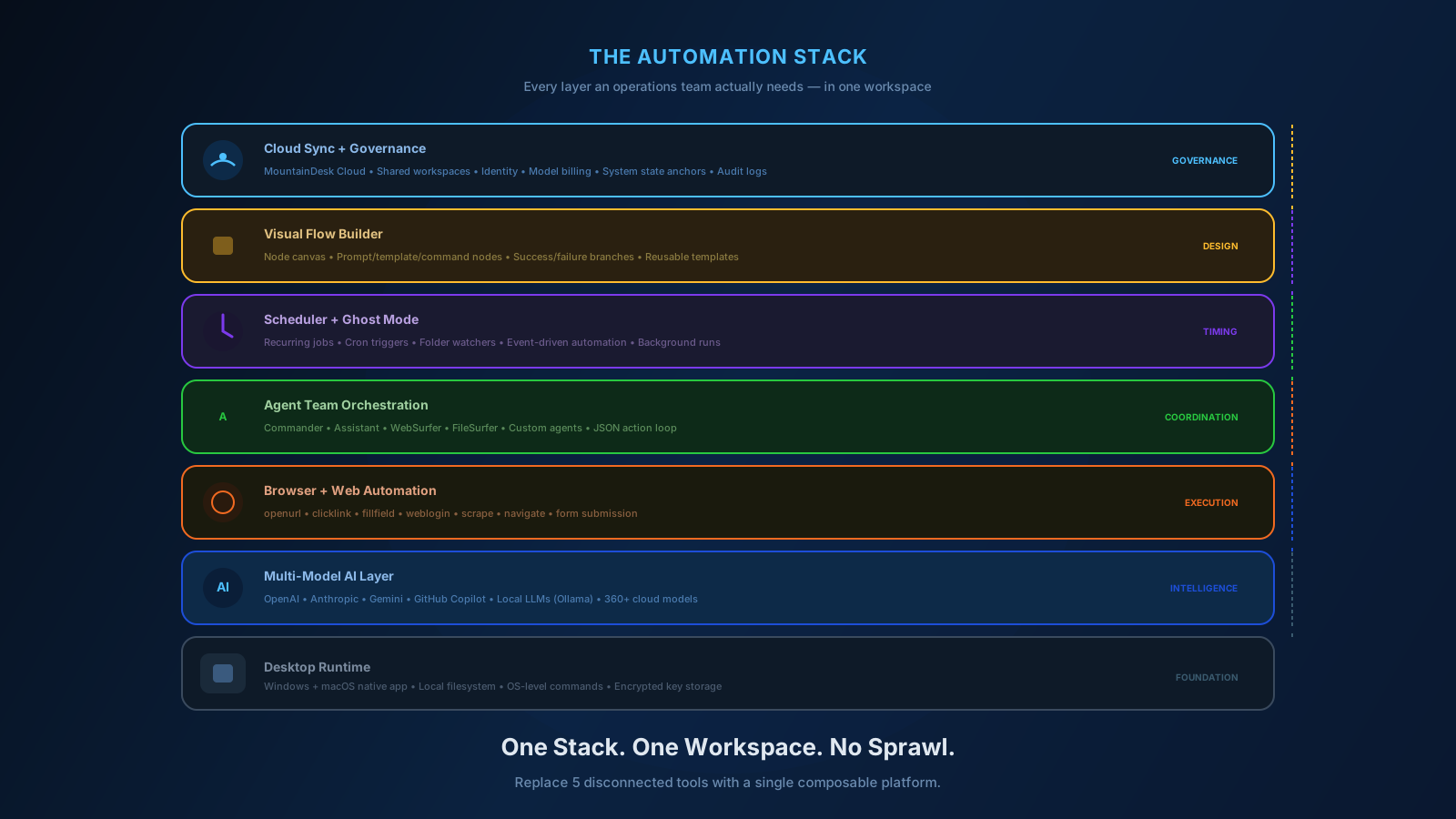
MountainDesk is designed to make levels 3 through 5 reachable for small and mid-size teams without enterprise complexity.
- Visual flow builder with prompt, template, and command nodes, plus success and failure branches.
- Scheduled jobs so recurring workflows run on time, with follow-up controls on success or failure.
- Command execution loop that lets agents produce runnable JSON actions, executes them, captures output, and feeds results back to the AI for follow-up.
- System state anchors that create a recovery point before risky automation runs.
- Cloud-backed workspaces so the whole team operates against the same prompts, flows, and history.
- Audit-friendly logs for inspecting what ran, when, with what inputs.
This is the toolkit for building automations that your team can actually trust.
Final Takeaway
Reliable automation is not a tooling problem.
It is a design problem.
Define the trigger. Define the inputs. Define the steps. Define the failure paths. Decide where humans stay in control. Give every workflow an owner.
Do that, and automation stops being a fragile pile of scripts and starts being an operating layer your team can actually rely on.
Ready to Build Workflows You Can Trust?
If you want a single workspace for AI agents, browser automation, scheduled jobs, and reusable flows, try MountainDesk.
MountainDesk gives operations teams a desktop control center for building, scheduling, and orchestrating reliable AI and browser automation workflows.