OpenClaw is genuinely interesting.
It is an open-source personal AI assistant you talk to from WhatsApp, Telegram, Discord, Slack, Signal, or iMessage. It runs on your own machine, has persistent memory, and can browse the web, run shell commands, and call tools through a growing skills ecosystem. The community around it is enthusiastic and creative — people are setting up agent armies, controlling smart-home devices, processing inboxes, and building skills on the fly from a phone.
It is also, deliberately, a different kind of product than MountainDesk.
If you are evaluating both, the question is not "which is better." The question is which model fits the kind of work you actually do.
This post is an honest comparison from the MountainDesk side. We respect what OpenClaw is doing. We are also clear about where MountainDesk is the better fit and why.
The Core Difference in One Sentence
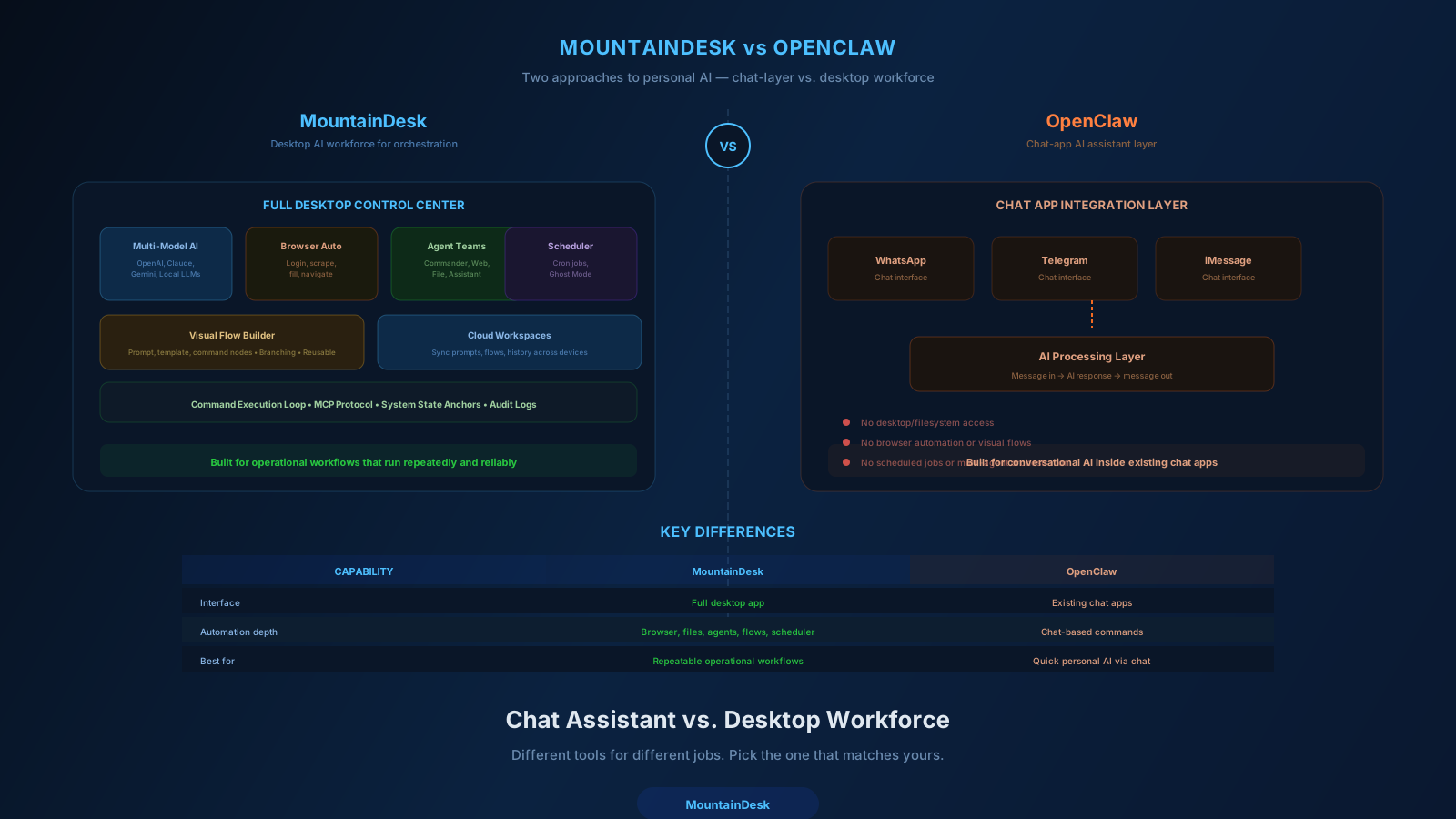
- OpenClaw is a personal AI assistant you mostly talk to from chat apps while it runs on your hardware.
- MountainDesk is a desktop operations control center for orchestrating multi-model AI, browser automation, scheduled jobs, and visual flows.
OpenClaw optimizes for the chat-to-AI experience anywhere you already chat.
MountainDesk optimizes for the orchestration-and-execution experience on a workstation that runs real work.
Both are valid. They aim at different jobs.
How Each One Looks in Practice
OpenClaw, Day to Day
- You message your assistant from WhatsApp or Telegram.
- It remembers context across conversations.
- It can browse, read files, run shell commands, and call skills.
- You extend it by adding skills (or asking it to add its own).
- The interface is conversational; the runtime lives on your machine.
MountainDesk, Day to Day
- You open a desktop control center with model picker, working folder scope, agents, scheduled jobs, and a visual flow builder.
- You run interactive sessions, schedule recurring work, design reusable flows, and trigger automations from folder events (Ghost Mode).
- You orchestrate specialized agents (Assistant, Commander, FileSurfer, WebSurfer) for different steps.
- The interface is operator-style; chat is one feature, not the entire surface.
The day-to-day shape is different even when the underlying capabilities overlap.
Capability Comparison
| OpenClaw | MountainDesk | |
|---|---|---|
| Primary surface | Chat apps (WhatsApp, Telegram, Discord, etc.) | Desktop control center (Windows / macOS) |
| Runtime | Local (Mac, Linux, Windows beta) | Local desktop (Windows + macOS) |
| Open source | Yes | No (commercial product) |
| Multi-model | Anthropic, OpenAI, local | OpenAI, Anthropic, GitHub Copilot, local LLMs, plus 360+ managed cloud models |
| Persistent memory | Yes | Yes (cloud workspaces, daily memory files) |
| Skills / extensibility | Community skills ecosystem | MCP protocol, agents, visual flow builder, command execution loop |
| Browser control | Yes | Native commands (openurl, clicklink, fillfield, weblogin) |
| Visual flow builder | No | Yes (prompt / template / command nodes, success and failure branches) |
| Scheduled jobs | Cron-style via skills | First-class with model + agent selection, follow-up behavior |
| Folder-event automation | Possible via custom skills | First-class as Ghost Mode |
| System state recovery | Not built-in | Instant system state anchors |
| Centralized model governance | Self-managed | MountainDesk Cloud (identity, billing, model policy, usage ledger) |
| Team / multi-user controls | Self-hosted, DIY | Enterprise SSO, audit logs, shared workspaces |
| Best surface | "Text my AI" | "Build, schedule, and orchestrate AI work" |
Both products can technically reach a lot of the same outcomes — the differences are in which path is shortest and which patterns each one is built around.
Where OpenClaw Is the Right Choice
It is worth being clear about this.
If your goal is to have a personal AI assistant you can talk to from any chat app, hosted on your own hardware, with a thriving open-source community building skills around it — OpenClaw is excellent at that. The chat-app integration story is genuinely best-in-class.
Choose OpenClaw if:
- Your primary interface is going to be WhatsApp, Telegram, Discord, Signal, or iMessage.
- You want open source and self-hostable.
- You want to extend it with community skills or build your own from a chat thread.
- Personal automation (life admin, smart home, inbox triage) is the main use case.
- You are a tinkerer who enjoys configuring and hacking on your assistant.
That is a real, valid product shape. We are not going to pretend otherwise.
Where MountainDesk Is the Right Choice
MountainDesk is built around a different center of gravity: operations work that needs structure.
Choose MountainDesk if:
- Your work is more "design and run repeatable workflows" than "chat with my AI from my phone."
- You want a visual flow builder with explicit branches, retries, and approval gates.
- You need scheduled jobs as a first-class feature with model and agent selection per job.
- You need folder-event triggers (Ghost Mode) as a maintained capability, not a custom skill.
- You want centralized model governance across a team (MountainDesk Cloud: identity, billing, usage ledger, plan-gated access to 360+ models).
- You want SSO, audit logs, on-premise deployment, and shared workspaces for an actual team.
- You want commercial product support with an SLA, not just community.
- You want system state anchors to make risky automation reversible.
If you are running real operations — not just personal life admin — the shape of MountainDesk fits the work better.
Where the Models Differ on Philosophy
A few honest, non-marketing differences worth naming:
1. Who Is the Primary User
OpenClaw aims at the individual with a personal AI. The chat-first UX is a reflection of that.
MountainDesk aims at the operator running real work — solo professionals, ops teams, consultancies, IT, devops, analysts, agency teams. The control-center UX reflects that.
2. The Role of Visual Flows
OpenClaw treats flows as code-and-skills. Power users love this; teams find it hard to share and audit.
MountainDesk treats flows as first-class visual artifacts that anyone on the team can read, edit, and run.
3. Governance and Multi-User
OpenClaw is self-hosted by design. Multi-user, billing, audit, and model policy are your problem.
MountainDesk Cloud provides those exact capabilities — identity, API key management, usage ledger, model governance per plan, admin controls, and a shared catalog of 360+ models — as a managed control plane on top of the desktop.
4. Support Model
OpenClaw is community-supported (with paid options emerging). Great for tinkerers, harder if your business depends on a workflow being healthy at 9am tomorrow.
MountainDesk offers priority support on Professional and dedicated support / SLA on Enterprise.
5. Interface Center of Gravity
OpenClaw shines when AI lives inside your chat threads.
MountainDesk shines when AI lives inside a workspace built for orchestration.
Neither is "the right answer." It depends on which gravity matches your job.
A Practical Decision Framework
Use OpenClaw if the answer to "where do I want to talk to my AI?" is "in WhatsApp, Telegram, or Discord."
Use MountainDesk if the answer is "in a workspace where I can design, schedule, and audit real operational work."
Use both if you want a personal chat-driven assistant and a desktop operations layer for the heavier orchestration work. They do not conflict.
A Worked Example
Same goal: every morning, check key competitors, summarize changes, push to your team.
OpenClaw Path
- Build (or install) skills for: web fetching, diff comparison, summarization, and Slack send.
- Set a cron-style heartbeat in the assistant.
- Output lands in the Slack channel via a skill.
- Iterate on the skills as edge cases appear.
Works. Skills-driven. Excellent if you enjoy that kind of building.
MountainDesk Path
- Open the visual flow builder.
- Drop in a WebSurfer node per competitor.
- Add a Commander node for diffing against yesterday.
- Add an Assistant node for the summary.
- Connect a success branch to the Slack notifier.
- Set a scheduled job: 7am daily, this flow, this model, this agent.
- Hit Save.
Works. Visual. Anyone on the team can open the flow and understand it without learning a skills DSL.
Different paths for different operating preferences.
The Honest Summary
OpenClaw is a fantastic project. The chat-app interface, the open-source ethos, the rapid skill creation, the personal-assistant feel — all real strengths. If you are an individual builder who wants AI in your pocket through chat apps, give it a serious look.
MountainDesk takes a different bet. It assumes that for real operational work — multi-step flows, scheduled jobs, browser-driven processes, multi-agent orchestration, and team-level governance — the right surface is a desktop control center backed by a cloud control plane, not a chat thread.
If you are doing personal life automation through a chat app, OpenClaw fits.
If you are running a workforce — even a workforce of one — that needs flows, schedules, governance, and audit, MountainDesk fits.
Most teams will end up with a clear preference once they look at the actual work they want to automate.
Try MountainDesk Free
Local-first desktop AI automation with multi-model agents, browser commands, scheduled jobs, visual flows, and an optional cloud control plane.
MountainDesk is the desktop AI workforce platform for operators who want orchestration, scheduling, governance, and audit alongside conversational AI.