Desktop AI automation is genuinely powerful.
You can run agents, drive browsers, schedule jobs, and orchestrate flows — all from one local workspace. For a single operator, that is often everything you need.
But the moment more than one person is involved, or more than one device, or more than one client, a different problem appears:
Who manages identity, billing, and model access?
That is the gap MountainDesk Cloud is built to fill. Not by replacing the desktop, but by giving it a control plane.
The Limits of Desktop-Only AI
A desktop AI tool is fast, private, and powerful. It is also bounded by where it lives.
When you grow past one operator, you start hitting predictable issues:
1. API Keys Sprayed Everywhere
Every desktop has its own copy of every key. Rotating a key means walking around to every machine.
2. No Shared Spend Visibility
Some operators burn tokens on the wrong models. Some flows accidentally loop. Nobody sees it until the bill arrives.
3. No Plan-Level Model Governance
You want junior operators on cheaper models and senior operators on premium ones. Without a central plane, there is no enforcement.
4. No Cross-Device Continuity
You start a flow on a desktop in the office. You want to check on it from a laptop on the road. The state lives in one place.
5. No Central Admin
You cannot easily add or remove team members, adjust credits, or audit who did what.
These are not desktop failures. They are control plane failures. The desktop is doing its job. Something else has to handle identity, billing, governance, and sync.
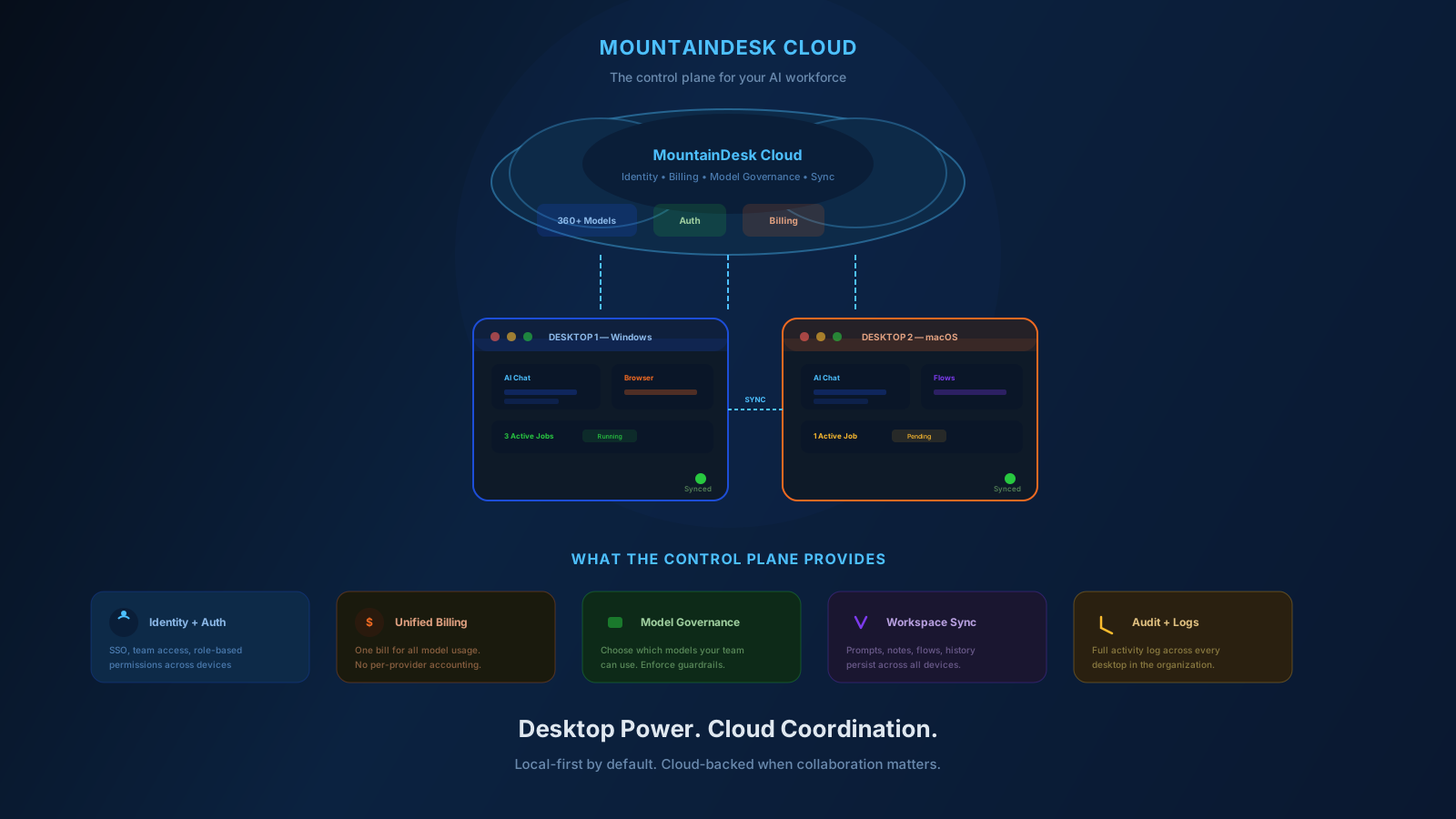
What a Control Plane Provides
A control plane sits above your execution surface.
It does not run the workflows. It governs them.
Specifically, it provides:
- Identity. Who you are, what role you have, what you can access.
- Billing. What you spent, on what, with what plan.
- Model policy. Which models a plan can reach, with what limits.
- Sync. Workspaces, history, and automations available across devices.
- Admin. Centralized management of users, plans, and credits.
This is exactly what MountainDesk Cloud is designed to do for the MountainDesk desktop.
What MountainDesk Cloud Includes
MountainDesk Cloud is built around six capabilities that give the desktop a real control plane.
1. Identity and API Keys
Accounts, roles, and API key management. The desktop registers against your account and inherits the right access. Keys live centrally, not on every machine.
2. OpenAI-Compatible Endpoint
A drop-in API endpoint your desktop and other tools can use. Switching providers no longer requires rewiring every client.
3. Usage Ledger
Token credits, spend tracking, and billing history visible per user and per plan. Operators see what they have used. Admins see the whole picture.
4. Model Governance
Expose only the models a plan should reach. Allowlists and cost caps per tier. Junior operators stay on the right models. Premium models stay reserved for the right work.
5. Commander Sync
Desktop commanders register and receive commands through the cloud relay. Multi-device, multi-user, single account.
6. Clipboard and File Sync
Push clipboard content and files to any registered commander on your account. Move work across machines without manual transfer.
7. Admin Controls
Superadmin panel for user management, plan assignment, and credit adjustments. Real operations, not just settings.
The result: your desktop AI workforce becomes a managed system, not a collection of independent installs.
Why This Matters as You Grow
A solo operator can get away with no control plane. A team cannot.
Here is what changes once a control plane is in place.
Spend Stops Being a Mystery
Every token consumption is attributed to a user, a plan, and a model. No more "where did the budget go?" at the end of the month.
Onboarding Takes Minutes
Add a user, assign a plan, and they can log in from a fresh desktop and start working. No manual key handoff. No bespoke setup.
Model Choices Become Policy
Cheaper models for high-volume internal work. Premium models for client deliverables. Local models for sensitive data. The plan enforces the rule.
Devices Become Interchangeable
Operators can switch between machines without losing context. Commanders register once and stay in sync.
Audit Becomes Possible
You can answer questions like "who ran what, when, against which model" without forensic detective work.
These are not luxuries. They are the difference between a tool you use individually and a tool your team can run on.
How the Plans Map to Real Use Cases
MountainDesk Cloud has three tiers, and they map to predictable team shapes.
Starter (Free)
For individual operators trying the platform with free models. One commander, limited prepaid token allowance. Good for evaluation and side projects.
Professional (€19 / month)
For working professionals who need paid cloud models and custom models. Up to 3 commanders, prepaid monthly tokens, workspace sync, history, and automation. This is the right tier for most independent operators and small consultancies.
Enterprise (€49 / user / month)
For teams needing the largest prepaid token pool, shared workspaces, audit logs, access controls, and dedicated support. The right tier when more than a few operators run real workflows daily.
The pattern is straightforward: Starter to evaluate. Professional to operate. Enterprise to scale.
How MountainDesk Cloud Works With the Desktop
The desktop and the cloud are designed to be complementary, not competing.
- Desktop runs the work. Local-first execution. Browser automation. Filesystem access. Real OS-level commands. Nothing that should stay private has to leave the machine.
- Cloud governs the work. Identity. Billing. Model access. Sync. Admin.
You decide what crosses the boundary.
For sensitive workflows, the desktop is enough. For team workflows, the cloud is what makes them sustainable.
This is the same pattern you see in mature dev tools — local execution, cloud control. It works because it respects both speed and governance.
A Practical Rollout Plan
If you are bringing MountainDesk Cloud into a team, you do not need to do it all at once.
Week 1
- Create the cloud account.
- Add the operators who will use it.
- Assign plans.
- Have everyone register their desktop commanders.
Week 2
- Move existing API keys to the cloud-managed setup.
- Define model policy per plan.
- Confirm spend visibility on the usage ledger.
Week 3
- Migrate one shared flow into the cloud workspace.
- Test cross-device continuity.
- Add admin reviews to the weekly ops cadence.
Week 4
- Audit usage from the past month.
- Adjust plans, credits, and model access based on real patterns.
- Standardize onboarding for new operators.
By the end of the month, your AI workforce has a real operating posture, not a pile of independent installs.
Common Questions
Do I have to use the cloud to use MountainDesk?
No. The desktop runs local-first by default. Cloud is opt-in.
Will my workflows leave my machine?
Only what you choose to sync. Sensitive flows can stay entirely local while others use the cloud.
Can I bring my own API keys?
Yes, including alongside cloud-managed access. You pick the model and the key per workflow.
Is the OpenAI-compatible endpoint usable from other tools?
Yes. Anything that speaks the OpenAI chat-completions API can point at the cloud endpoint.
What about on-premise?
Enterprise plans include on-premise deployment support for regulated environments.
Final Takeaway
A serious AI workforce needs more than a desktop tool.
It needs a control plane.
Identity. Billing. Model governance. Sync. Admin.
That is what MountainDesk Cloud adds. The desktop keeps doing what it is best at — running real work locally. The cloud takes care of everything that has to be coordinated across people, devices, and plans.
Together, they turn MountainDesk from a powerful individual tool into a manageable team platform.
Ready to Add a Control Plane to Your AI Workforce?
Create a free MountainDesk Cloud account and connect your desktop in minutes.
Create free MountainDesk Cloud account →
MountainDesk Cloud powers the MountainDesk desktop with identity, billing, model access, and workspace sync — one account, many devices.