Two years ago the local-vs-cloud debate had a simple answer: cloud always wins on quality, local always wins on privacy and cost.
That answer is no longer correct.
Local models like gemma 4-26b, qwen 3.6-27b, gpt-oss, and the latest gemini-3-flash-preview weights now run on workstation-class hardware with quality that, for many automation tasks, is functionally indistinguishable from cloud frontier models. At the same time, the frontier — GPT-class, Claude, Gemini Pro, Grok, and the open frontier challengers like nemotron-3, ring-2.6, mistral-medium-3-5, granite-4.1, owl-alpha, laguna-xs, cobuddy — has pulled away on the hardest reasoning tasks.
The right question is no longer "which side wins."
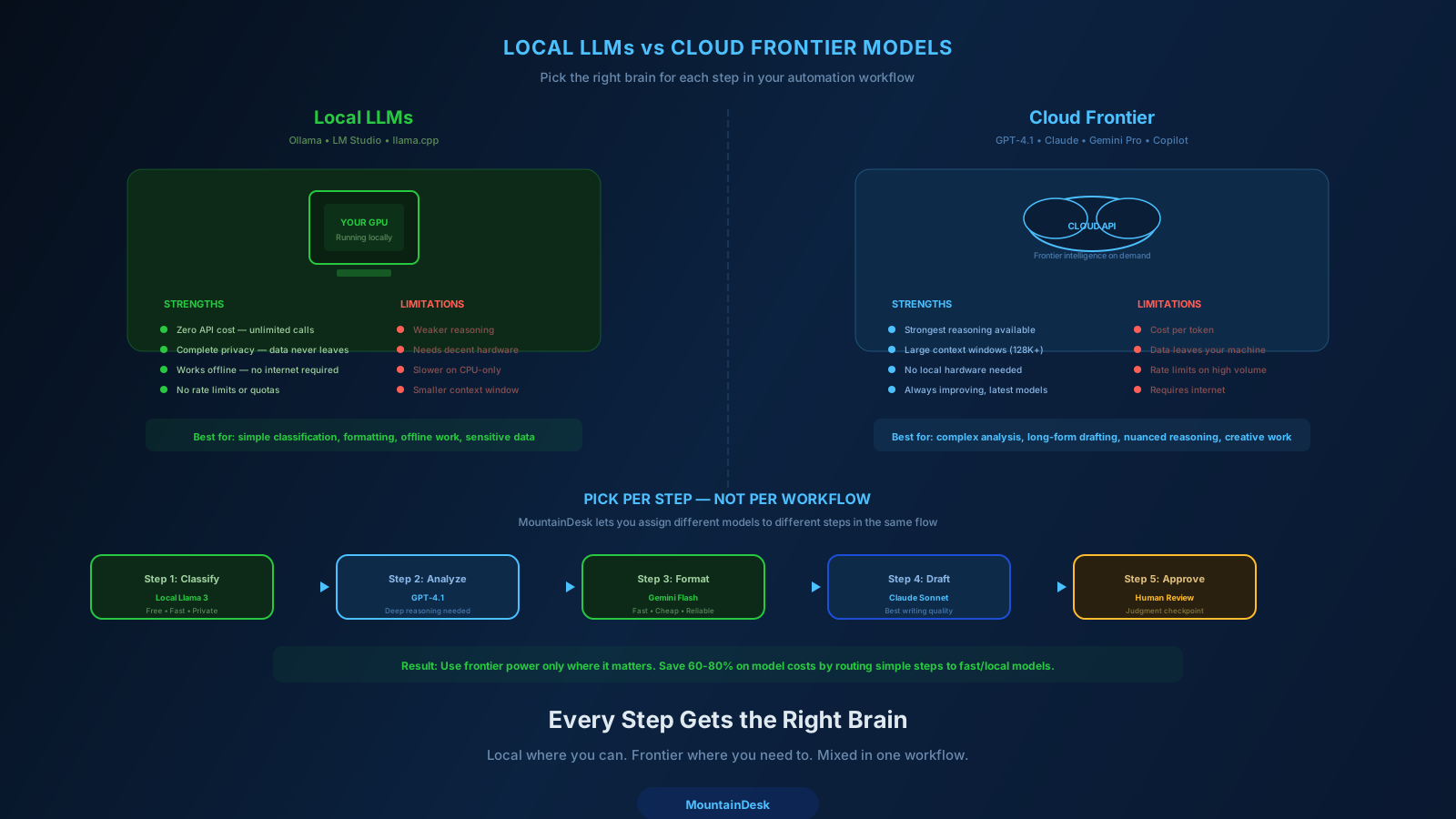
The right question is which model runs which step.
This post explains how to make that decision deliberately.
What Local Models Are Actually Good At Now
Modern open-weights local models, run on a decent workstation (24-48GB VRAM is enough for most), are now strong at:
- Structured extraction. Parsing emails, documents, invoices, web content into clean JSON with high schema compliance.
- Classification and routing. "Which category does this support ticket belong to?" "Which pipeline stage does this lead deserve?" Local models handle this at scale, cheaply, with no roundtrip latency.
- Summarization. Multi-document and conversation summarization where the source content is the primary signal.
- Drafting first passes. Initial outreach emails, internal updates, status messages where a human will edit before sending.
- Tool selection in agent loops. Choosing which tool to call with what arguments — the bread-and-butter of automation orchestration.
- Code helpers for routine tasks. Renames, refactors, scripts, explanations on familiar codebases.
For all of these, the gap to cloud frontier models is small or non-existent. The cost gap is enormous (zero marginal per-call cost vs. metered API).
What Cloud Frontier Models Are Still Best At
The hardest cases still favor frontier cloud models:
- Multi-hop strategic reasoning. Synthesizing information across long documents, drawing conclusions that require multiple inferential leaps.
- Long-context retrieval quality. Handling 100k+ token contexts with reliable recall across the whole window.
- Hard math, theorem-style proofs, complex code architecture. Tasks where small reasoning errors compound.
- Final client-facing deliverables. Where the last 5% of polish makes the difference between "looks AI-written" and "looks professional."
- Adversarial inputs. Inputs designed to confuse or jailbreak the model — frontier safety training matters here.
- Newest frontier capabilities. The cutting-edge stays in the cloud first, then trickles down.
If your workflow has a step in any of these categories, that is a great candidate for a frontier cloud model — even if 90% of the rest of the flow is happy with a local one.
The Cost Reality
Let's be specific.
| Model class | Approx. cost per 1M output tokens | Latency | Privacy |
|---|---|---|---|
| Local (gemma 4-26b, qwen 3.6-27b, gpt-oss, gemini-3-flash-preview local) | $0 marginal | 200-1500ms | Local |
| Cloud Flash-class (gemini-3-flash-lite, mistral-medium, granite-4.1) | $0.10 - $0.50 | 300-1500ms | Cloud |
| Cloud frontier (GPT-class, Claude, Gemini Pro, Grok) | $5 - $30 | 800-4000ms | Cloud |
For a workflow that runs 10,000 model calls a month with average 1k tokens per call:
- Pure local: ~$0 marginal (you already paid for the GPU)
- Pure Flash-class cloud: $1 - $5
- Pure frontier cloud: $50 - $300
If the workflow produces the same business outcome on either path, that is a 10x to 100x cost difference.
The teams getting this right do not pick one path. They route per step.
The Routing Strategy That Actually Works
A practical model-routing strategy looks like this:
1. Default to a Fast, Cheap Model
For the common case, use a Flash-class cloud model or a strong local model. This handles 70-90% of steps with no quality penalty.
2. Upgrade Specific Steps for Quality
For steps that are the final deliverable, require multi-hop reasoning, or have a high cost-of-error, route to a frontier cloud model.
3. Use Local for Sensitive Data
If the input contains personal data, internal docs, client confidential material, or regulated content, route to a local model regardless of what the same step would use elsewhere.
4. Use Cloud for Massive Context
When you need to stuff long context into one call and rely on retrieval quality, frontier cloud models still have the edge.
5. Use Specialized Models for Specialized Jobs
- Image generation steps → DALL-E, Stable Diffusion, or compatible.
- Multimodal vision input → Gemini or Claude vision-capable variants.
- Code-heavy work → Copilot models or code-specialized variants.
The result is a workflow where every step is running on the smallest, cheapest, most appropriate model that can actually do that step well.
A Worked Example: Document Processing Pipeline
Goal: monitor a folder for incoming contracts, extract key fields, flag risks, generate a summary, and notify a human.
| Step | Model | Reason |
|---|---|---|
| Watch folder, OCR if needed | n/a (built-in) | Not a model job |
| Extract structured fields (parties, dates, amounts) | local gemma 4-26b | Sensitive content, structured extraction, high volume |
| Classify document type | local qwen 3.6-27b | Cheap, fast, fully local |
| Initial risk flagging | gemini-3-flash-preview (cloud or local) | Routine pattern matching |
| Deep risk analysis on flagged sections | cloud frontier (Claude / GPT-class) | High cost-of-error, judgment matters |
| Generate plain-language summary | gemini-3-flash-preview | Routine drafting |
| Polish summary if going to a client | cloud frontier | Final-deliverable quality |
| Notification to Slack | n/a (action) | Not a model job |
Sensitive content stays local. The expensive frontier model is reserved for the two steps that actually need it. Total cost per document drops dramatically while quality stays high.
This is the pattern. It is not exotic. It just requires a platform where you can pick a different model per step without rebuilding the workflow.
Common Mistakes Teams Make
Mistake 1: One Model for Everything
"We use GPT-class for everything because it's safest." Sounds responsible, costs 10x more than necessary, and is overkill for 80% of your calls.
Mistake 2: Local-Only Religion
"We never use cloud models because privacy." Sometimes correct. Often costs you on the steps where the cloud frontier genuinely outperforms — and sometimes those are the steps where quality matters most.
Mistake 3: Choosing by Leaderboard
"This model is #1 on the latest benchmark, so we should switch." Benchmarks rarely match your actual task. Run a small benchmark on your workload before switching defaults.
Mistake 4: Ignoring Latency
A model that is 2 seconds slower per step adds up across an agent loop and a scheduled job that runs hourly. Latency is a real metric, not a footnote.
Mistake 5: Hardcoding the Model
"We picked Claude for this flow." Now you cannot swap a step to a cheaper model without editing six places. Make model selection a per-node setting from day one.
How MountainDesk Makes This Routing Practical
Picking the right model per step only pays off if your platform makes that easy to do.
MountainDesk is built around this pattern:
- Unified model picker showing local and cloud models in one dropdown — including local Flash-class models (gemini-3-flash-preview, gemma 4-26b, qwen 3.6-27b, gpt-oss) and 360+ managed cloud models such as gemini-3.1-flash-lite, openai/gpt-chat-latest, x-ai/grok-4.3, ibm-granite/granite-4.1-8b, mistralai/mistral-medium-3-5, openrouter/owl-alpha, nvidia/nemotron-3-nano, baidu/cobuddy, inclusionai/ring-2.6-1t, poolside/laguna-xs, and more.
- Per-flow model override — Each scheduled job and visual flow declares its model.
- Per-node model override — Individual nodes inside a flow can declare a different model than the flow default.
- Local-first execution surface — Local models run inside the same agent loop and tool-use environment as cloud models. There is no second-class citizen.
- Cloud workspace governance through MountainDesk Cloud — Plan-gated model allowlists, usage ledger per user and per model, billing visibility — so teams can standardize and audit which workflows run across a 360+ model catalog.
- BYOK and managed access — Bring your own API keys for direct providers, or use the OpenAI-compatible cloud endpoint for centralized billing and policy.
The combination means you can route per step without rebuilding flows or maintaining separate environments for local and cloud work.
How to Decide Today
If you are starting fresh:
- Pick a local default for sensitive, high-volume, structured-extraction work. A 26-32B-class open-weights model is a strong starting point.
- Pick a cloud Flash-class default for everything routine that does not need to stay local.
- Pick a cloud frontier model for the handful of steps where final-deliverable quality or hard reasoning matters.
- Wire the workflow so any node can override the model.
- Measure per step: latency, cost, error rate, output quality. Adjust defaults monthly.
That is the operating discipline. Models will keep changing. The discipline of routing per step does not.
Final Takeaway
The local-vs-cloud debate is over. Both are now first-class citizens in real automation workflows.
The teams getting the most out of AI in 2026 are not picking sides. They are picking per step.
Local for sensitive, high-volume, structured work. Flash-class cloud for routine work that does not need to stay local. Frontier cloud for the high-stakes steps where reasoning and polish matter most.
Pick a platform that makes that routing trivial. Then route deliberately.
Try MountainDesk Free
Mix local LLMs and cloud frontier models in the same workflow, with per-node model selection.
MountainDesk is the desktop AI automation platform that lets operators route between local and cloud models per workflow step.