The most valuable AI workflows in your business are the ones you never have to start.
They run on a schedule. They watch for the right trigger. They produce a result. They notify you when something needs your attention.
You wake up to work that already happened.
That is the difference between AI as a chat tool and AI as a workforce. And it almost entirely comes down to two ideas: scheduled jobs and event triggers.
Here is how to think about both, and how to use them without creating a runaway pile of background processes.
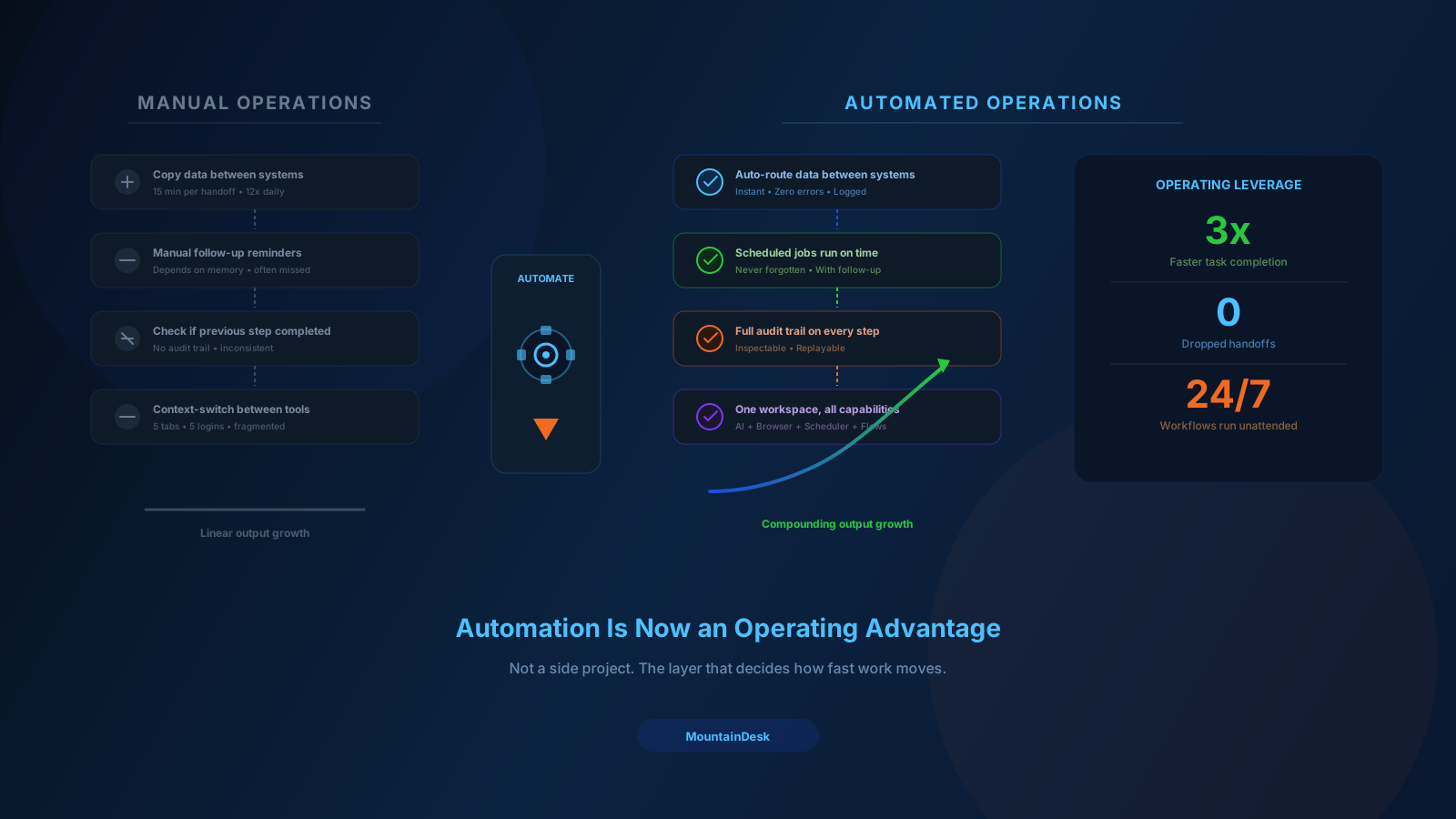
Why Manual AI Stops Scaling
Manual AI usage looks like this:
- You remember a recurring task.
- You open a tab.
- You paste context.
- You write a prompt.
- You wait.
- You copy the result somewhere useful.
- You move on.
That loop is fine once a week. It collapses the moment you have ten of them, twenty of them, or a team that depends on them happening reliably.
Three things go wrong:
- Forgetting. Tasks slip when nobody remembers them.
- Drift. Different operators run them differently.
- Time tax. Skilled people spend hours starting work that does not need them at all.
The fix is not to do them better manually. The fix is to make them never need a human to start.
Scheduled Jobs: The First Step Out of Manual
A scheduled job runs on a clock.
Every day at 7am. Every Monday at 9am. Every hour during business hours.
That sounds simple, but the impact compounds quickly.
Workflows that benefit immediately from scheduling:
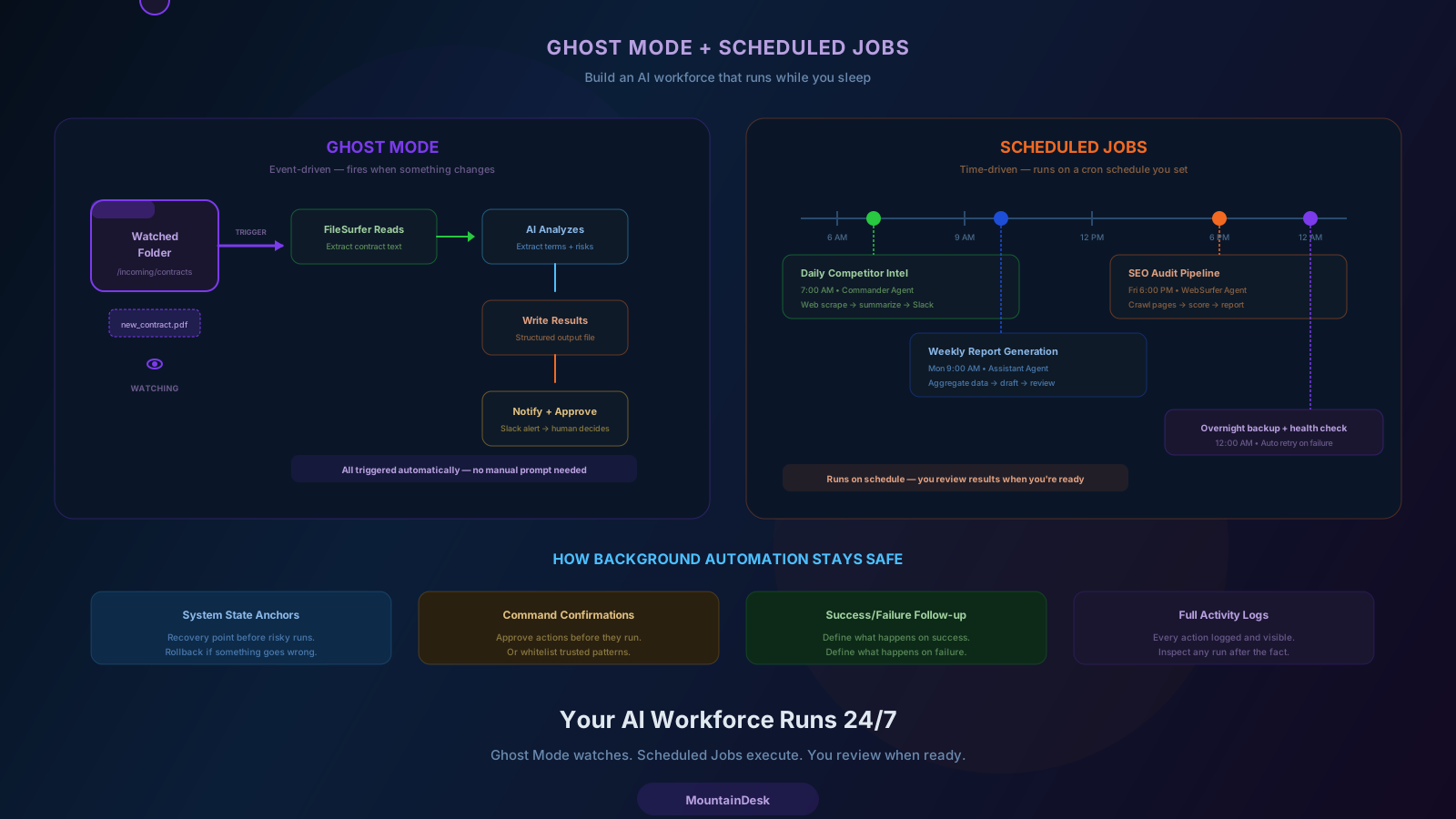
- Daily competitive intel. Pull updates from competitor sites and summarize.
- Weekly metrics digests. Pull from analytics, format, send to leadership.
- Recurring research. Track price changes, regulatory updates, news mentions.
- Pipeline hygiene. Surface stale deals, missing contacts, overdue follow-ups.
- Content production. Drafts, ideas, briefs queued before your team starts work.
- Health checks. Verify integrations, monitor endpoints, catch silent failures.
None of these need a human to start. They need a human to review.
That is exactly what a good scheduled job system delivers.
What a Real Scheduled Job System Should Do
Not all schedulers are equal. A useful scheduled job layer needs:
1. Real Triggers
Cron-style schedules at minimum. Plus pause, resume, and one-off runs.
2. Model and Agent Selection per Job
Different jobs deserve different models and different agents.
3. Flow-Mode Execution
Some jobs are a single prompt. Some are full multi-step flows. The scheduler should run both.
4. Success and Failure Behavior
What happens when the job succeeds? What happens when it fails? Both deserve explicit configuration.
5. A Single Activity Stream
Every run, every result, every error in one place. Not scattered across email, Slack, and disk.
6. Recovery Points
For jobs that touch the system, a way back when something is wrong.
If your scheduler is missing any of these, the jobs you build on top of it will eventually become a maintenance burden.
Event Triggers: Going Beyond the Clock
Schedules cover predictable work. Event triggers cover reactive work.
An event trigger fires automatically when something specific happens:
- A new file lands in a folder.
- A file changes.
- A system event occurs.
- An external webhook is received.
This is what MountainDesk calls Ghost Mode.
Some of the highest-leverage automations are reactive, not scheduled:
Document Intake
A contract drops into an "incoming" folder. AI reads it, extracts key terms, flags risk, and drops a summary alongside it. A human only sees the summary.
Lead Routing
A new lead lands in a CSV folder. AI classifies it, scores it, and routes it to the right pipeline stage. A human only handles edge cases.
Asset Pipelines
A new design file appears. AI generates variants, captions, and metadata. The team picks what to ship.
Support Triage
An export of new tickets arrives. AI categorizes, prioritizes, and drafts responses. Agents review and send.
Event-driven automation removes the start from the workflow. The work begins itself.
When to Use Scheduling vs. Triggers
Use scheduling when:
- The work is predictable in time.
- The trigger is "the day passed" or "the week passed."
- You need a heartbeat — even doing nothing is information.
Use event triggers when:
- The work is unpredictable in time.
- The cost of delay is real.
- The trigger is "something happened."
Most mature setups use both. A scheduled job runs the morning report. A Ghost Mode trigger handles the inbox throughout the day. Together, they cover predictable and reactive work.
How to Avoid Background Sprawl
A real risk of background automation is sprawl.
Six months in, you have forty scheduled jobs and twenty triggers. Some are useful. Some have silently broken. Nobody is sure which is which.
Three habits prevent this.
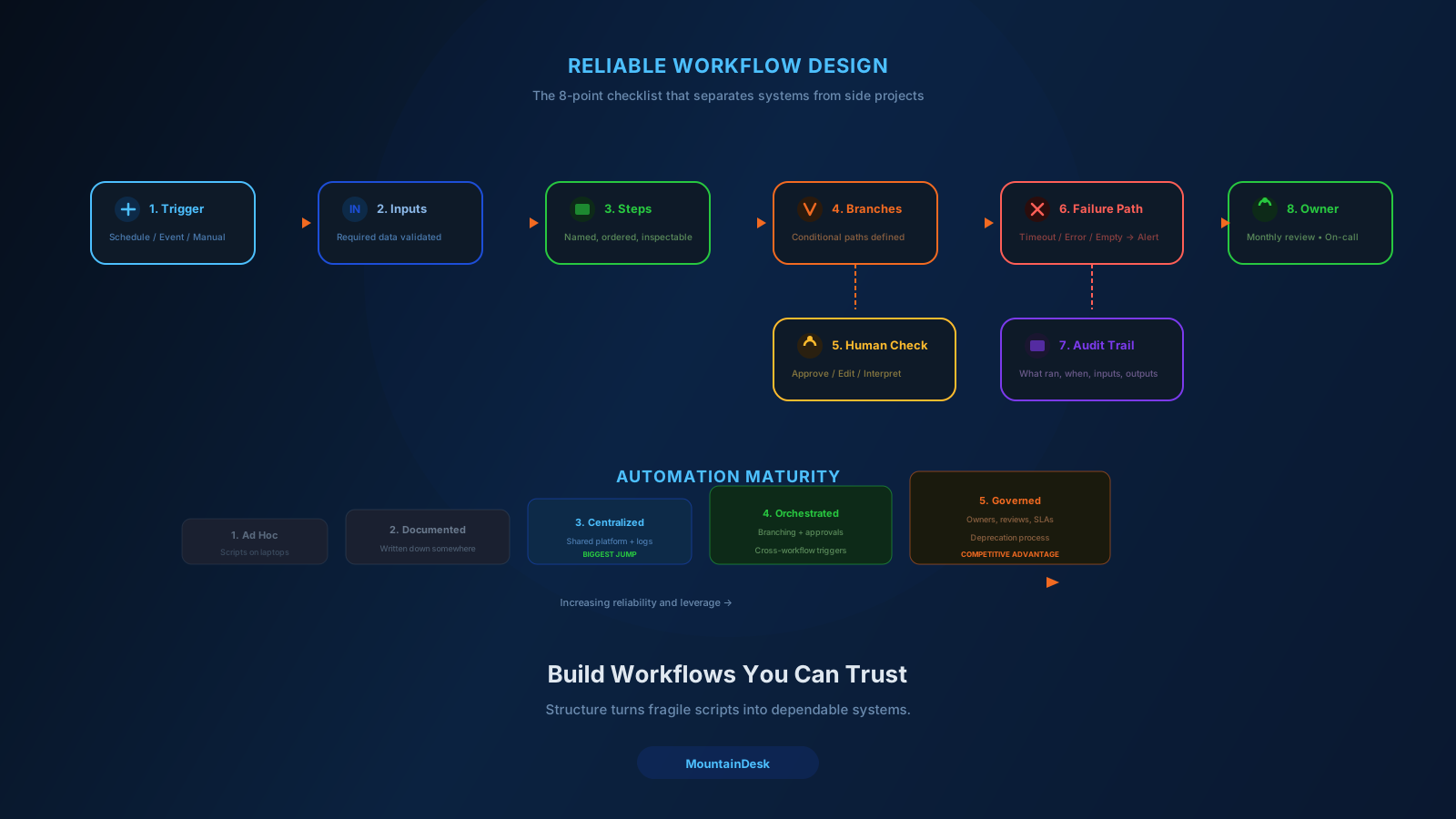
1. Every Job Has an Owner
A specific person is responsible for whether the job is healthy and whether it should still exist.
2. Every Job Has a Review Cadence
Quarterly at minimum. Is it still useful? Is it still working? Is it still producing what we expected?
3. Every Job Has a Deprecation Plan
Jobs that are no longer needed get retired. They do not just keep running because nobody noticed.
This is the same discipline that keeps internal tools healthy. Apply it to your background automation and the leverage compounds instead of decaying.
A Practical First Week
If background automation is new to your team, here is a one-week starting plan.
Day 1: Pick Two Workflows
- One predictable (a morning report).
- One reactive (a folder-triggered intake).
Day 2: Map Both on Paper
Trigger, inputs, steps, branches, failure paths, owner.
Day 3: Build the Predictable One
Set the schedule. Configure the model and agent. Define success and failure behavior. Wire the notification.
Day 4: Build the Reactive One
Set the watch path or event. Configure the same shape: agent, flow, success, failure, notification.
Day 5: Run Both, Watch the Activity Stream
Look at every run. Catch the failure modes you missed.
Day 6 and 7: Add Approval Where Needed
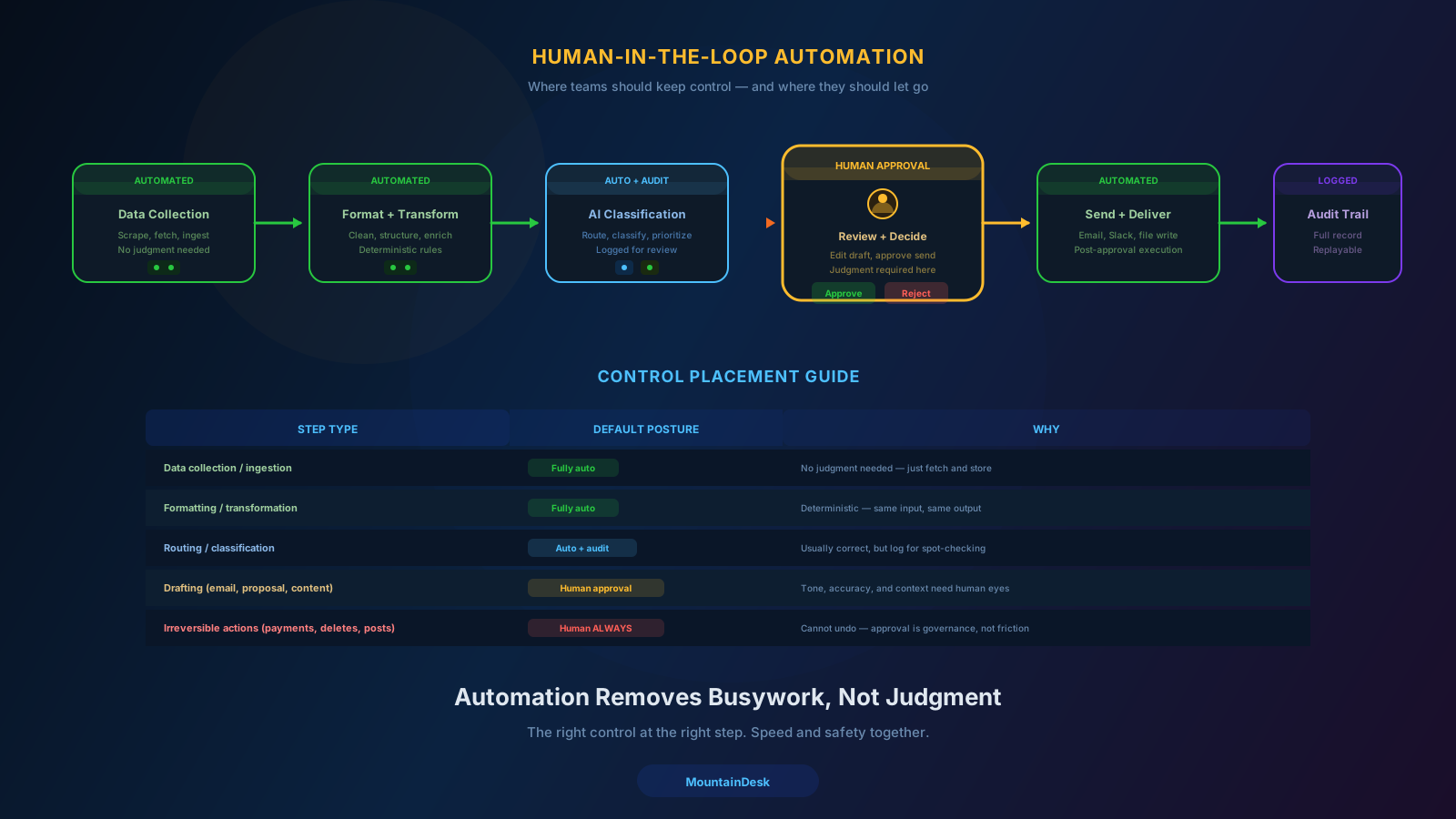
For anything irreversible — sending, posting, paying, deleting — add a human gate.
By Monday of week two, you have two workflows running in the background that produce real value while you sleep.
That is the foundation. Everything else is repetition.
How MountainDesk Supports Background Automation
MountainDesk is built specifically for this kind of work.
- Scheduled jobs with cron-style schedules, model and agent selection, flow-mode execution, and success/failure follow-up behavior.
- Ghost Mode to monitor folders, process changes, and system events, then trigger AI actions automatically without manual prompts.
- Visual flow builder so multi-step automations are inspectable, branchable, and reusable.
- Activity stream that surfaces every run, result, and error in one place.
- System state anchors that create recovery points before complex automated runs.
- Slack and Telegram integration so background activity reaches the operator wherever they work.
- Multi-model and multi-agent support so the right model and the right agent run the right job.
- Local-first execution so background work involving sensitive files never has to leave the machine.
Background automation is one of the highest-leverage things a small team can adopt. The platform you choose determines whether that leverage compounds or decays.
Final Takeaway
The biggest unlock in AI for operations in 2026 is not a smarter model.
It is work that starts itself.
Schedule the predictable jobs. Trigger the reactive ones. Keep humans on review, not on starting the work. Treat each job as a product with an owner, a review cadence, and a deprecation plan.
Do that, and your AI workforce stops needing your attention to function — and starts giving you your attention back.
Ready to Build an AI Workforce That Runs Without You?
If you want scheduled jobs, Ghost Mode triggers, visual flows, and an activity stream in one workspace, try MountainDesk.
MountainDesk is the desktop AI automation platform for teams that run scheduled and event-driven workflows in the background, reliably.