For the first wave of AI adoption, the unit of value was the prompt.
You typed a question. You got an answer. You decided what to do with it.
That model is fine for casual use. It is the wrong model for running a business.
The teams getting real leverage out of AI in 2026 are not writing better prompts.
They are designing orchestrated systems — workflows where multiple agents, tools, and steps coordinate to produce a reliable outcome, on a schedule, with human checkpoints in the right places.
This is the shift from using AI to orchestrating AI. Here is what it actually means and how to do it without overengineering.
What Orchestration Actually Means
Orchestration is the practice of coordinating multiple capabilities into one workflow.
In an AI context, those capabilities usually include:
- One or more language models
- Specialized agents with different roles
- Browser or web automation
- File and data operations
- External APIs and services
- Scheduled triggers
- Human approvals
A single prompt uses one capability. An orchestrated workflow uses several, in sequence, with branches, retries, and review.
Think of the difference between:
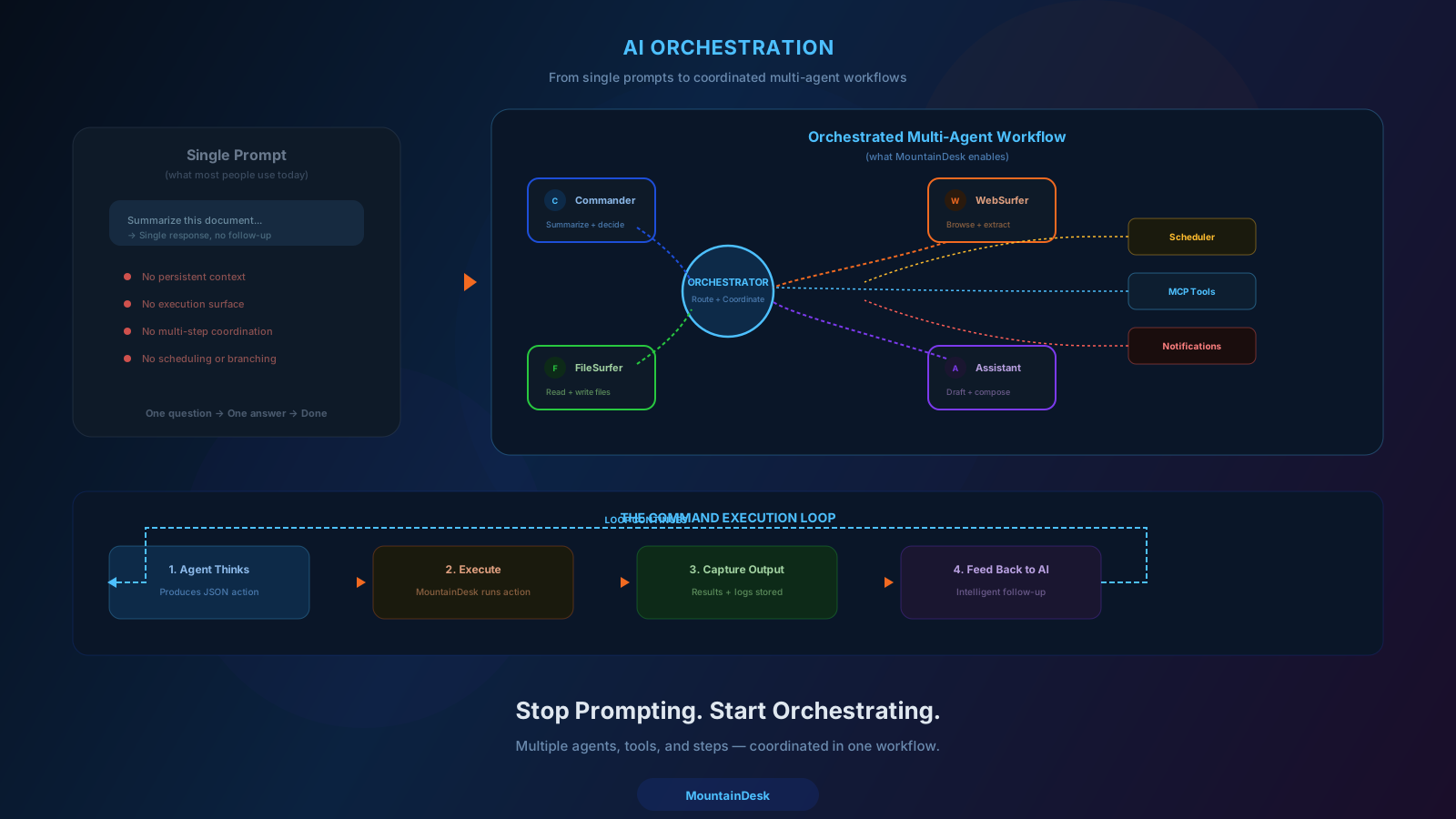
Single prompt: "Write me a competitor analysis."
Orchestrated workflow:
- WebSurfer agent collects data from five competitor sites.
- Commander agent normalizes and structures the data.
- Assistant agent drafts the analysis.
- A validation step checks for missing sections.
- The output is dropped into a folder and pinged to Slack.
- A human reviews and approves before it goes to the client.
Same goal. Wildly different reliability.
Why Single-Prompt Thinking Stops Working
Single prompts have three structural limitations:
1. No Persistent State
Each prompt is independent. Important context has to be re-supplied every time.
2. No Branching
The model produces one output. If it is wrong, you start over manually.
3. No Coordination Across Tools
The model can describe what to do across systems, but it cannot actually drive those systems.
For one-off questions, none of that matters.
For repeatable business workflows, all of it matters.
The Building Blocks of AI Orchestration
You do not need exotic infrastructure to orchestrate AI well. You need five primitives.
1. Specialized Agents
Different roles for different jobs. A research agent. A writing agent. A reviewer agent. A browser agent. Each one has a clear scope and a clear prompt.
2. Tool Use
Agents need real tools — file operations, browser actions, API calls, command execution. The model decides what to do. The tools actually do it.
3. Flows
Multi-step sequences with explicit nodes for each action, including branches for success and failure.
4. Triggers
Schedules, file events, webhooks, manual runs. Workflows should not depend on humans remembering to start them.
5. Checkpoints
Human approval gates and audit logs at the steps where it matters.
When you compose these five primitives well, you stop "asking AI for help" and start running an AI workforce.
A Map of Common Orchestration Patterns
You do not need to invent new patterns. Most production AI workflows fall into a handful of recognizable shapes.
Pattern 1: Pipeline
A linear sequence of steps. Output of step N feeds step N+1. Common for: research-to-draft, scrape-to-summary, ingest-to-classify.
Pattern 2: Branch and Merge
A step splits into multiple parallel branches that produce outputs, then merges them. Common for: multi-source research, parallel drafting, multi-model voting.
Pattern 3: Loop Until Done
A step runs repeatedly until a condition is met. Common for: agent reasoning loops, multi-page scraping, iterative refinement.
Pattern 4: Trigger and Dispatch
An event triggers a workflow that classifies the input and routes it to one of several specialized sub-flows. Common for: support triage, lead routing, document intake.
Pattern 5: Schedule and Report
A recurring trigger runs a flow that produces a report and notifies humans. Common for: daily competitive intel, weekly metrics, monthly reviews.
Most real systems are combinations of these. Knowing the patterns saves you from inventing fragile one-off designs.
Where Most Orchestration Projects Go Wrong
Even teams that take orchestration seriously often stumble in the same places.
1. One Mega-Agent Instead of Specialized Agents
A single "do everything" agent is harder to debug, harder to improve, and more expensive to run than a small team of focused agents.
2. No Schema Validation Between Steps
The model returns "almost JSON." The next step crashes. Validate every structured handoff.
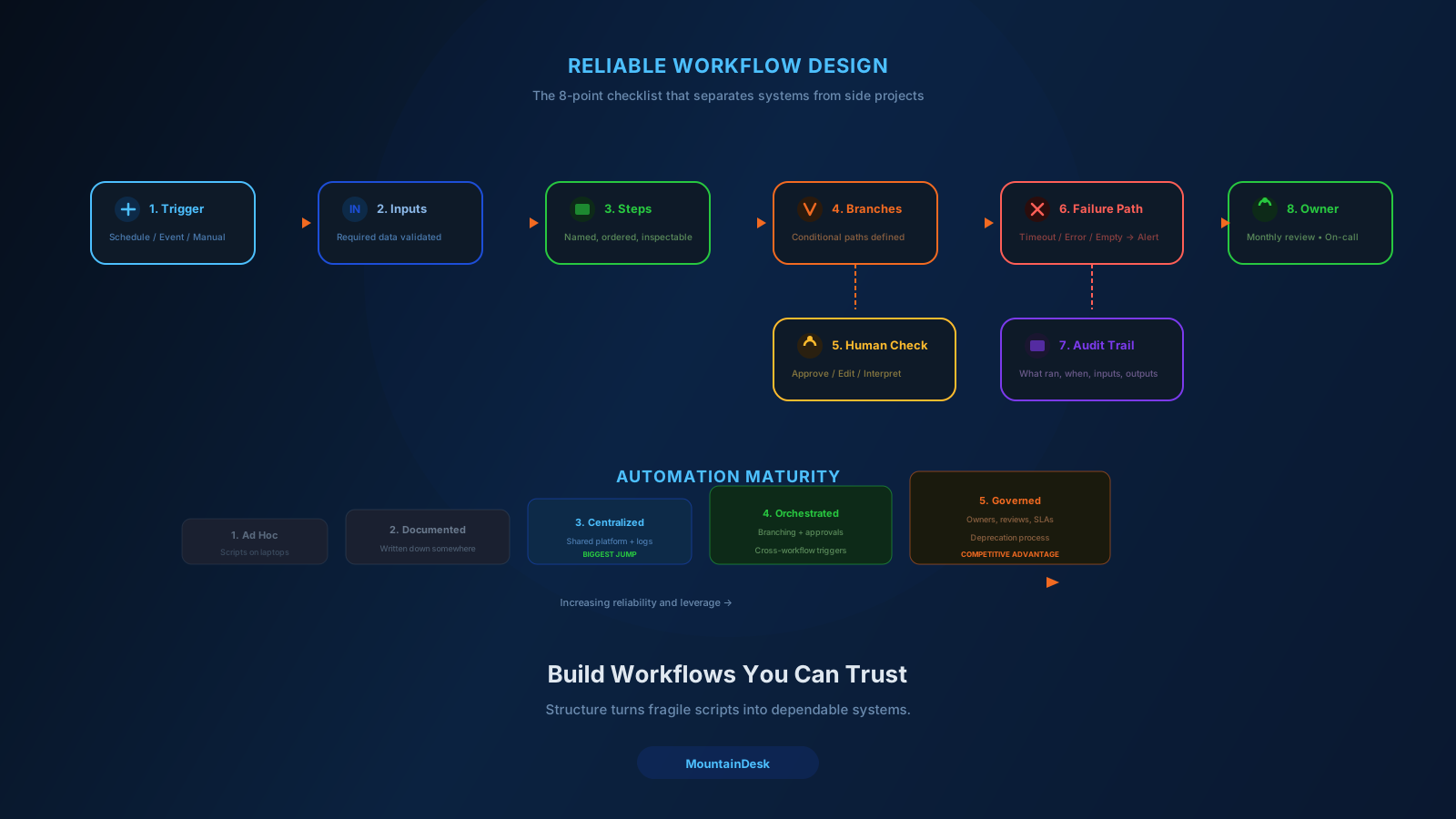
3. No Failure Path
What happens when the browser step times out? When the API returns 429? When the model returns nothing? Design these answers up front.
4. Hidden in Code Instead of Visualized
A flow that only one engineer can read is a flow that only one engineer can fix. Visualize the orchestration so the team can reason about it.
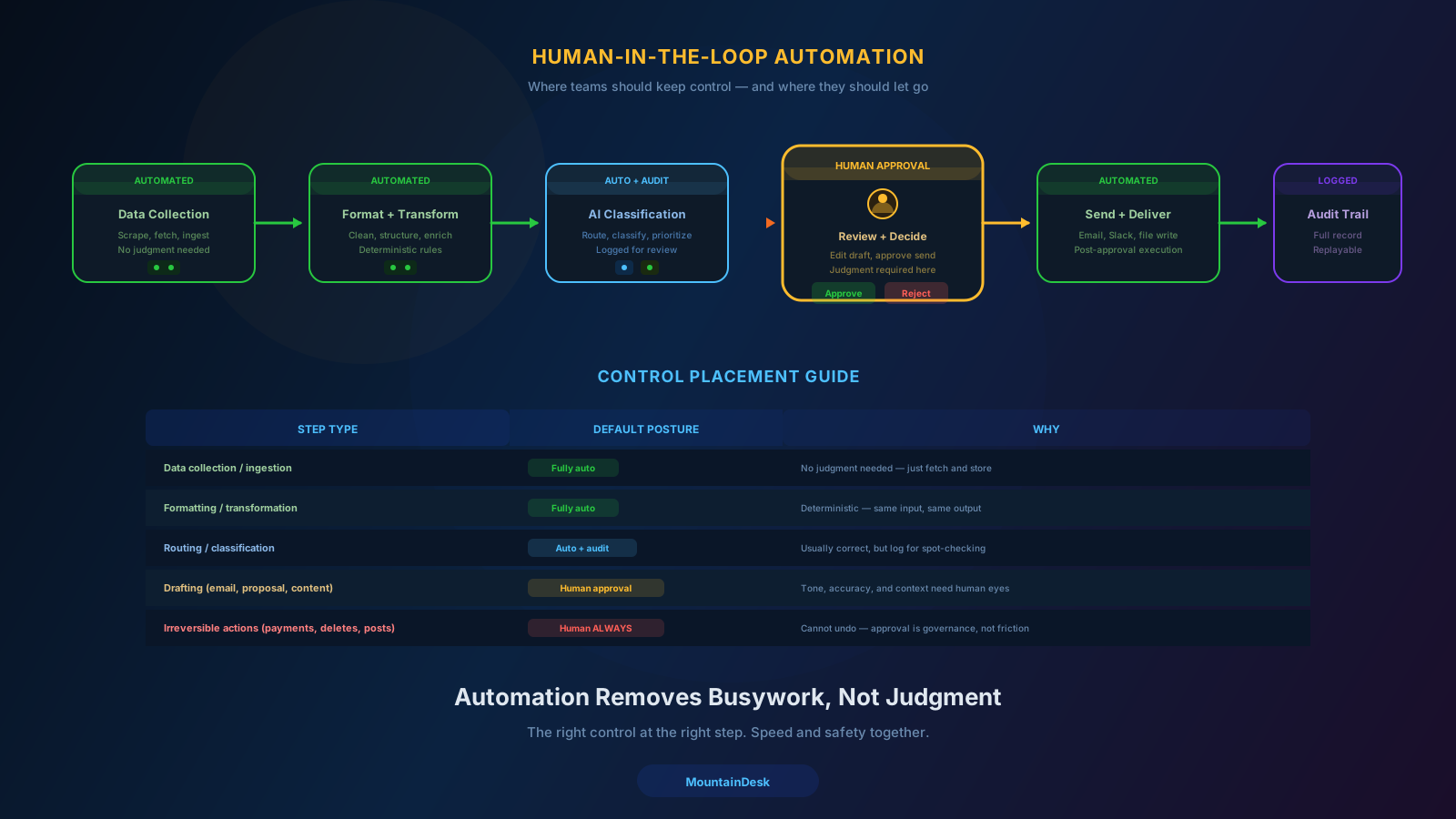
5. No Human Gate on Irreversible Actions
Orchestration should accelerate work, not amplify mistakes. Every send, post, payment, or delete deserves an explicit approval step.
How to Start Orchestrating Without Overengineering
You do not need to redesign your entire business in week one. The pragmatic path looks like this:
Step 1: Pick One High-Frequency Workflow
Choose something that runs at least weekly, touches multiple tools, and has clear failure costs.
Step 2: Map It on Paper
List the trigger, inputs, steps, branches, checkpoints, and failure paths before building anything.
Step 3: Build It as a Visual Flow
Use a flow builder, not a single mega-prompt. Each node should do one thing.
Step 4: Add a Schedule and a Notifier
Make it run on its own. Make sure a human knows when it ran.
Step 5: Add Approval Where Needed
For any step that is irreversible or high-stakes, gate it with a human review.
Step 6: Measure and Improve
Track failure rate, run time, and the number of human interventions. Improve the steps that produce the most pain.
In two to four weeks, you will have one workflow that runs reliably. That is the foundation everything else builds on.
Why Orchestration Beats "More Tools"
The natural reaction to AI complexity is to buy more tools.
A prompt tool. A scraping tool. A scheduler. A workflow builder. A monitoring tool. A notifier.
That stack works on day one and breaks on day ninety. You end up with five products that do not share state, six logins, and no clear place to debug a failed run.
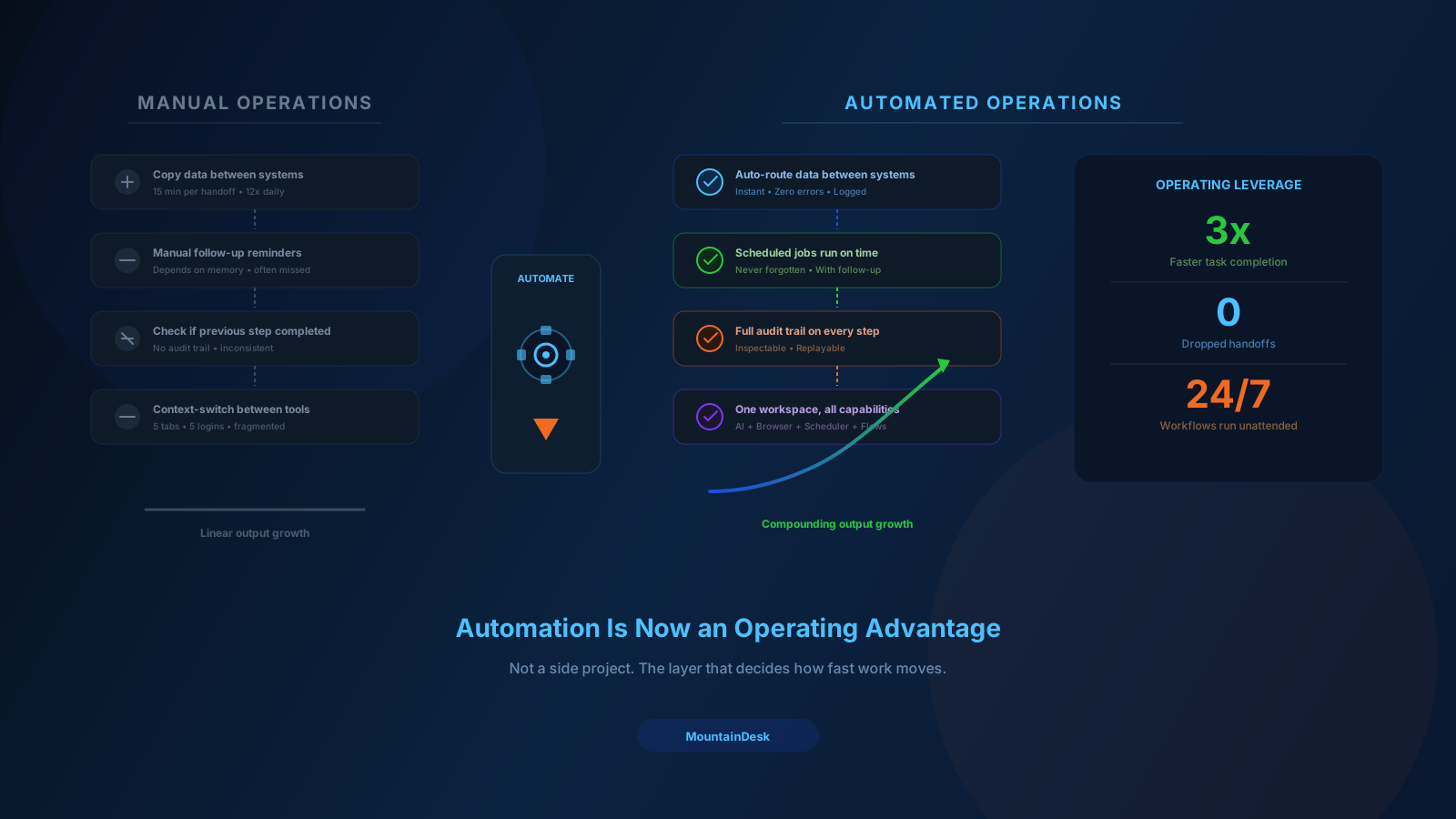
Orchestration solves this by collapsing the layers.
When prompting, agent execution, browser automation, scheduling, flows, approvals, and audit all live in one workspace, the workflow itself becomes the unit of value — not the tool.
That is what makes orchestration sustainable.
How MountainDesk Supports AI Orchestration
MountainDesk is built for this model from the ground up.
- Agent team orchestration. Route tasks to specialized agents like Assistant, Commander, FileSurfer, or WebSurfer with customizable names and roles.
- Command execution loop. Agents produce runnable JSON actions, the platform executes them, and results feed back into the next step.
- Visual flow builder. Design multi-step flows with prompt, template, and command nodes; success and failure branches; and scheduler-ready execution.
- Multi-model control. Switch between OpenAI, Anthropic, GitHub Copilot, local LLMs, and managed cloud gateways inside the same flow.
- Browser and web automation. Built-in commands like
openurl,clicklink,fillfield, andwebloginfor real browser-driven steps. - Scheduled jobs. Run flows on cron-style schedules or on triggers, with success and failure follow-up behavior.
- Ghost Mode. Watch folders and system events to fire AI actions automatically.
- Cloud workspaces. Share prompts, agents, and flows across the team.
- System state anchors. Recovery points before risky orchestrated runs.
- MCP protocol support. Extend orchestration to external tools through standard interfaces.
The point is not to hand-roll orchestration in code. The point is to make orchestration something an operator can design, run, and improve on their own.
Final Takeaway
The next decade of business AI is not about better prompts.
It is about better orchestration — coordinating multiple agents, tools, and steps into reliable workflows that your business can actually run.
Start with one workflow. Use specialized agents. Visualize the flow. Schedule it. Gate the risky steps. Measure and improve.
Do that consistently, and AI stops being a chat partner and starts being a workforce.
Ready to Move From Prompts to Orchestration?
MountainDesk is the desktop platform for orchestrating AI agents, browser tasks, and scheduled flows from one workspace.
MountainDesk gives operations teams the building blocks for real AI orchestration — agents, flows, browsers, schedules, and approvals in one place.